Excalidraw
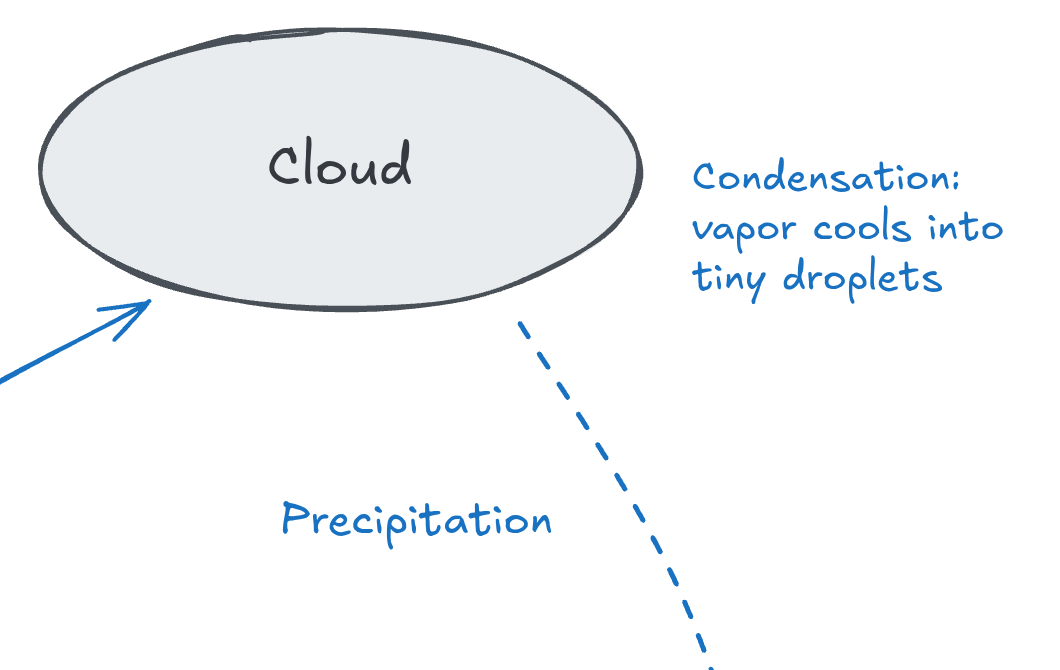
Excalidraw is an open-source whiteboard that makes every box, arrow and label look sketched by hand, so a diagram reads as an idea being worked out rather than a finished poster. Engineers plan software with it and teachers explain processes with it. Here it opens on a water cycle: drag the cloud and its arrows follow, double-click a label to rewrite it, then add the steps the diagram leaves out. Free, in the browser, no account needed to try it.
Using this with a class? Make a free class and add your students yourself: each gets a username and password, with no email or Google account needed. Or give them one join code. Using Google Classroom? Post the link there; with a free class, the link also puts each student in your class, so you see their work. mytekDev is also available from the Google Workspace Marketplace, so your school's Google admin can install it for everyone.A first lesson: Everyone gets the same unfinished water cycle and ten minutes to add what is missing, then two students put their diagrams side by side and explain what the other one forgot.
Set up a free class Share to Google ClassroomWhat a student actually does
They drag the cloud across the page and the arrows attached to it bend to follow. They double-click the word Runoff and type a better one, change the precipitation arrow from dashed to solid, and pick a new color for the ocean. Then they read the sticky note, press R for a rectangle, draw a box for groundwater, and connect it with an arrow from A. Ctrl+Z takes back anything they regret.
From there it is a blank whiteboard with no edge. Rectangles, diamonds, ellipses, arrows, lines, freehand drawing and text, each with its own stroke, fill, sloppiness and font. Students group shapes so they move together, align a row of boxes, send a shape behind another, and lock the parts they are done with. With a free account Ctrl+S saves the drawing to their projects, and a teacher in their class can open it.
The wobble is not random each time it is drawn. Every shape stores its own seed number, and the drawing library uses that number to make the same sketchy lines on every screen, so a diagram looks the same tomorrow as it did today. The Sloppiness setting, from Architect to Cartoonist, decides how far the lines stray.
What they are learning while they draw
Nothing here is presented as a lesson. This is what the activity is made of.
| What the student does | What it is |
|---|---|
| Adds the missing steps to the water cycle | Diagrams as models. A diagram leaves things out on purpose. Deciding what belongs on it is deciding what matters. |
| Connects boxes with arrows | Process and flow. An arrow claims that one thing leads to another. Every arrow on the page is a statement that can be right or wrong. |
| Closes the loop back to the ocean | Cycles and chains. Some processes end and some come back around. The shape of the diagram shows which kind this is. |
| Rewrites a label | Labeling. A shape without a word is a guess. Short, exact labels are what turn a drawing into an explanation. |
| Makes the title bigger and the notes gray | Visual hierarchy. Size, color and position tell a reader what to look at first, before they read a single word. |
| Groups and aligns shapes | Layout. Things that line up look related. Space between groups shows where one idea ends and the next begins. |
| Moves a shape and watches the arrows follow | Structure over decoration. The connections are part of the drawing, not paint on top of it, so the diagram can be rearranged without being redrawn. |
| Explains the diagram to a partner | Visual explanation. If the listener needs more than the page to follow it, something is missing from the page. |
How to tell whether it landed
Ask, and let them show you. A student who has understood it can answer these without help.
- What does each arrow on your diagram claim is happening?
- What did the starter leave out, and where did you put it?
- Why is this drawn as a loop instead of a line from left to right?
- Which part of your diagram does someone see first, and is that the part you wanted?
- If you had to cut your diagram to five shapes, which would you keep?
Use it in your subject
Not a technology class? Then the app is how students show what they learned in your unit. More projects for every subject.
Science
Draw a life cycle, a food web or a circuit, with an arrow for every step and a short label on each one.
English
Map a story: boxes for the characters, arrows for how they affect each other, and notes for the turning points.
History
Build a cause and effect chain for an event from the unit, then argue about which arrow is the weakest.
Practical notes
- AgesAges 9 through high school. Younger students relabel and add to a diagram; older ones plan a whole explanation from a blank page.
- TimeSeconds to the first change. A finished diagram of a process from a unit takes twenty to forty minutes.
- EquipmentA computer or Chromebook with a modern browser. A mouse or trackpad works; a touchscreen with a stylus works too. Nothing to install.
- CostFree. The app has no paid tier.
- PrepNone. Open the page and go. Reading this page first takes about three minutes.
- In a groupEveryone can start from the same unfinished diagram, then compare what each person decided was missing.
For co-ops, microschools, and classrooms
Hand out one unfinished diagram and ask what is missing. The answers come back different, and the discussion about whose arrows are right is where the science, or the history, actually gets learned.
- Shapes, arrows that stay attached, text and freehand drawing on a page with no edge.
- Drawings save to the student's account, and a teacher can open any student's work.
- No install, no lab setup, no per-seat license. Chromebooks are fine.
- Student work is private by default. Sharing anything publicly is a separate, deliberate action.
Common questions
Is this the original Excalidraw?
It is the Excalidraw editor, made by the Excalidraw team and contributors and started by Christopher Chedeau, used under the MIT license. This is not excalidraw.com. What we add is saving each drawing to a free account, private by default, with a preview in the student's project list, and a view for teachers of their students' drawings. The drawing tools are the ones Excalidraw users already know.
Can I download it, or do I need to install anything?
There is nothing to download or install: it runs in the browser on Chromebooks, Windows, Mac and Linux. In this version drawings save to your account rather than to files on your computer, so the export and open file menu items are turned off.
Is it only for students?
No. It is a full whiteboard for anyone. Much of this page is written for teachers and parents because many of the people who use it are students.
Is Excalidraw free here?
Yes. It runs in your browser and there is no paid tier. A free account adds saving, but nothing on this page is behind a paywall.
Does my child need an account to try it?
No. The demo on this page is the complete editor with the water cycle loaded, and it keeps your changes inside the browser tab. Make a free account and the diagram you changed comes with you as your first project.
Can students draw on the same diagram at the same time?
Not in this version. Each student works on their own drawing. Live shared rooms are a feature of excalidraw.com and are not part of what we host.
What ages is it for?
Ages 9 through high school. Moving and relabeling shapes works for anyone; planning a clear diagram from a blank page suits older students.
Is my child's work public?
No. Projects are private by default. Publishing to the public gallery is a separate action a student has to take, and public listings mask the display names of younger students.
What subject can I log this as?
Log it as the subject the diagram is about. A water cycle is science, a story map is English, and a cause and effect chain is history. The table above lists what the drawing itself practices, so you can point at the evidence.
Still have a question? Ask us, and a person will write back.
Where to go next
Start with Excalidraw
Trying it costs nothing and takes about five minutes. An account is what makes the work last.
Excalidraw is one of the making apps on the platform. It is a place to make things, not a course, and it is not a substitute for a teacher: it is at its best when an adult asks the questions above and takes the answers seriously.
Excalidraw is by the Excalidraw team and contributors, used under the MIT license. Source.
Page last reviewed October 2026.
Google, Google Classroom and Chromebook are trademarks of Google LLC.