Firewall Lab
Students can define a firewall and still believe it is a box that keeps hackers out. A real one is an ordered list of rules, read from the top, where the first rule that matches a packet decides it. Firewall Lab gives students that list on a wall between the internet and a class server, sends a day of traffic at it, the class's and an attacker's mixed together, and counts both sides.
Using this with a class? Make a free class and add your students yourself: each gets a username and password, with no email or Google account needed. Or give them one join code. Using Google Classroom? Post the link there; with a free class, the link also puts each student in your class, so you see their work. mytekDev is also available from the Google Workspace Marketplace, so your school's Google admin can install it for everyone.A first lesson: Open Order Matters and read its two rules out loud before anyone presses Run the day: Allow web in from anyone, then Block any service in from 203.0.113.66. Ask the class whether the busy computer gets in. Then run it and watch every one of its requests stop at rule 1, never reaching rule 2.
Set up a free class Share to Google ClassroomWhat a student actually does
The stage is side on. On the left are the computers out on the internet, such as classmates and families at home and an unknown computer. In the middle is the firewall, a brick wall with the student's rule cards down its face, numbered from the top. On the right is the machine being protected, with a lit door for each service it runs. Packets travel as small tags with a colored band for their service. Each one reaches the wall, the card that decides it flashes, and the tag goes through or stops at the wall with a cross. Two counters sit above the stage: Class through and Attack kept out. A network is done when both are full.
A rule is a card that reads as a sentence, such as Allow remote login in from the teacher's laptop. Its chips choose what it does (Allow, Block or Limit), the service (web, name lookups, mail delivery, email apps, remote login, remote desktop, database, game server, file sharing, any service, or a port number typed in), who it is from (anyone, the school, the class's room, the teacher's laptop, or an address or range typed in) and, on the network that needs it, the direction, in or out. Cards are dragged up and down the list, up to 12 of them, and the last line is the default: Block everything else or Allow everything else.
There are six networks, in any order, and each one opens with rules a person would really write and that are wrong in one way. Class Site lets everything in by default, so a port scan walks the server's doors. Teacher Login leaves remote login open to anyone while three computers guess passwords. Game Night allows any service in, and someone finds the database and remote desktop. Order Matters has a block rule that never runs. The Lab is a lab computer with something on it calling out to a stranger, so its rules face out, and the answers to its own web and name lookups come back in because the firewall keeps track of conversations it started. What No Rule Stops ends on a phishing email and a flood, and the student marks them as attacks a firewall cannot stop.
The check under the rules reads them before any run: a rule that never runs because an earlier one decides its packets first, a rule that does nothing new, any service let in from anyone, remote login or a database open to the internet, a default that lets everything in. After a run it names the packet that got blocked or got in and the card that decided it. Click any packet to see which rule decided it. In high school mode the real ufw line sits under every rule, and in middle school mode it is one click away, under Show the real line. Get the ufw script gives the whole set as a script for a practice Ubuntu machine. Print the rule card prints the rules in plain words with their ufw lines, the counters, the check, and three questions for a classmate.
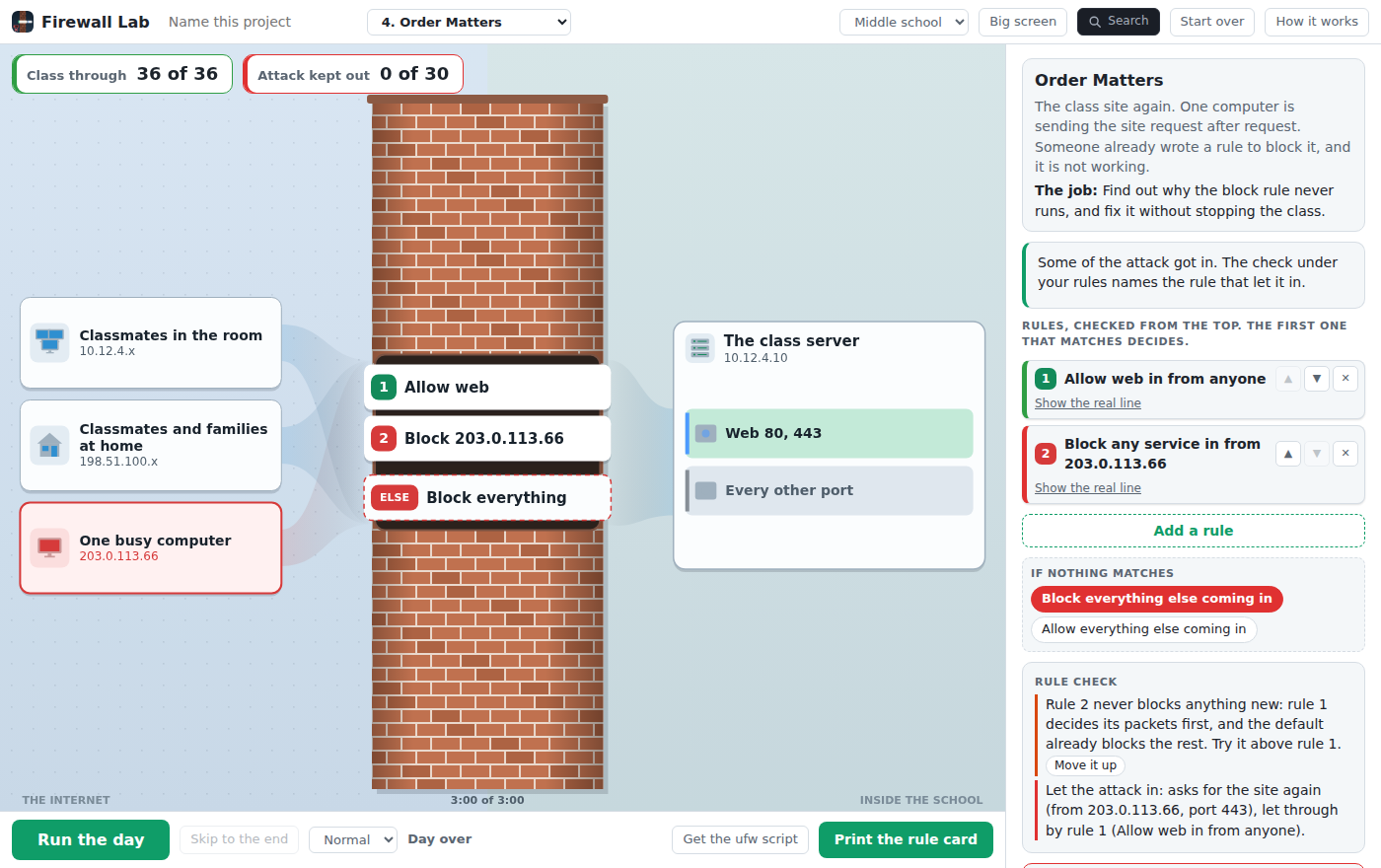
Order Matters after a run. The block rule is there, but it sits under a rule that lets the web in from anyone, so every request from the busy computer is decided before it gets a turn. The check under the rules says so and offers the fix: move it above rule 1.
What they are learning while they work
Nothing here is presented as a lesson. This is what the activity is made of.
| What the student does | What it is |
|---|---|
| Moves Block 203.0.113.66 above Allow web from anyone and sees the busy computer stop | First match. The rules are read from the top, and the first one that matches a packet decides it. A wide rule high up decides before a narrow rule lower down ever sees the packet, so the exceptions go first. |
| Changes the last line to Block everything else and watches the scanner's tags stop at the wall | Default deny. Anything no rule mentions falls to the default. Blocking by default and allowing only the services that are used is how most firewalls are set up, because a door nobody remembered to close is still open. |
| Locks remote login to the teacher's laptop instead of anyone | Source addresses and least privilege. A rule can match where a packet comes from as well as where it is going. A login only one person uses only needs to be reachable from one address. |
| Tries Limit on remote login and sees 39 of the 54 guesses kept out, not all of them | Rate limiting is not a lock. Limit blocks an address that starts 6 or more connections in 30 seconds, ufw's own figure. It slows password guessing down; an address rule, or keys instead of passwords, is what stops it. |
| Turns off Keep track of conversations in The Lab and watches the answers to its own lookups get blocked | Stateful and stateless filtering. A stateful firewall remembers the conversations this side started and lets their answers straight back in. Without that, every answer has to get past the rules, and opening ports for them also opens them to a fake answer. |
| Allows mail in and still sees the phishing email arrive | What a firewall cannot do. A firewall like this one reads where a packet comes from, where it is going and which door it uses. A trick email comes from a real mail server on the mail door, and a flood fills the line before it reaches the firewall. Those need a mail filter, people who know the signs, and the internet provider. |
How to tell whether it landed
Ask, and let them show you. A student who has understood it can answer these without help.
- Order Matters already had a rule to block the busy computer. Why did it never run?
- A packet matches rule 2 and rule 5. Which one decides it, and why?
- Why is Block everything else a safer last line than Allow everything else?
- Limit is on remote login and some password guesses still reach the login. What rule would keep all of them out?
- The Lab's web pages come back in, and no rule lets them in. How?
- Name one attack no firewall rule could stop, and what does stop it.
Use it in your subject
Not a technology class? Then the app is how students show what they learned in your unit. More projects for every subject.
AP Cybersecurity
Addresses Unit 3, Topic 3.4, Protecting Networks: Firewalls: rules checked in order with the first match deciding, changing the order changing what is allowed, stateless and stateful filtering, and Scenario 3A, letting outside traffic reach a web server while blocking the rest. Order Matters is the ALLOW then DENY example both ways round.
High school cybersecurity and CTE networking
Addresses CSTA 3A-NI-06, 3A-NI-07 (the two counters are the tradeoff between usability and security) and 3A-NI-08, and CYBER.ORG 9-12 standards on ports and protocols and on shutting down services that are not used. A step before CyberPatriot teams touch ufw on a real image.
Middle school computer science
In grades 7 and 8, Class Site and Teacher Login as a model of a security measure: CSTA 2-NI-05 and CYBER.ORG 6-8 on firewalls and allow and block lists. Middle school mode keeps the ufw lines one click away, under Show the real line.
Homeschool and co-ops
Game Night is a family game server: who should be able to join, and which doors should not be open at all. The printed rule card is the thing to talk over.
Practical notes
- AgesHigh school cybersecurity, networking and AP Cybersecurity are the home ground. Grades 7 and 8 can do the first two networks as a model, in Middle school mode.
- TimeOne period for Class Site, Teacher Login, Game Night and Order Matters. A second for The Lab, with rules going out and conversations, and What No Rule Stops.
- EquipmentA computer or Chromebook with a modern browser. Nothing to install, and nothing in the app touches a real network: every packet is pretend traffic in the page. A projector for Big screen, where the space bar runs the day. A printer if you want the rule cards on paper.
- CostFree. The app has no paid tier and no AI.
- PrepFix the Class Site yourself (one click on the last line, then Run the day), then open Order Matters and fix it by moving one card. That is the whole demo, about five minutes.
- In a groupGrade level in the header switches between Middle school and High school. High school shows the real ufw line under every rule; Middle school keeps it one click away.
For co-ops, microschools, and classrooms
Every network keeps its own rules, so a class can work through them in any order and pick up where they left off. With a free account each student's rules come back as a saved project, with a line that says how it went, such as "Teacher Login: 2 rules, the class all through, the attack all kept out", and a shared project lets anyone watch the day run against those rules.
Common questions
Is it free?
Yes. Firewall Lab has no paid tier, and it can be tried right on this page without an account. Saving needs a free account.
Does it send anything on the school network?
No. Every packet is simulated in the page: the app sends, scans and probes nothing, and every address in it is private or from the ranges set aside for examples. The attacks are seen from the defender's side and are named by what they do, never by a tool.
Is the ufw script real?
Yes. Every rule becomes a ufw line, the firewall that comes with Ubuntu, in the patterns from ufw's own manual, and every line pattern was checked with ufw's dry run. The script is for a practice Ubuntu machine the student is allowed to change. Its addresses are the lab's examples and have to be changed to the real network's first, and its comments say how not to lock yourself out over SSH.
Do all firewalls decide this way?
ufw, iptables, most routers and Cisco access lists use the first match with a default at the end, like the lab and like AP Cybersecurity 3.4. A few decide differently: pf takes the last match, and on Windows a block rule beats an allow rule. The help in the app says so.
What does it simplify?
It protects one machine at a time, like ufw on a server, not a network firewall in front of many machines. Rules match the service's port and protocol, never the source port. Blocking always drops quietly. In the lab one packet is one password guess, where real SSH allows a few tries per connection, and web traffic is TCP only, though browsers also try 443 over UDP. Home addresses are spread all over the internet, so the lab's home range is a stand-in.
Is it the same as the school's web filter?
No. A web filter judges which site and what is on it. A firewall rule judges the address, the port and the protocol. They often live in the same box, but they do different jobs, and no network in the lab blocks game websites.
Where do the numbers come from?
Limit's 6 connections in 30 seconds is ufw's own figure. The ports are the standard ones (web 80 and 443, remote login 22, name lookups 53 on UDP and TCP, and 25565 for the game server, the port Minecraft uses). The check's line about any service let in from anyone comes from Avishai Wool's study of 37 real firewalls from companies, labs and universities, where about 4 in 5 did.
Still have a question? Ask us, and a person will write back.
Where to go next
Start with Firewall Lab
Trying it costs nothing and takes about five minutes. An account is what makes the work last.
Firewall Lab is one of the making apps on the platform. Every packet's verdict comes from the same first-match rules the script exports, so the day a student watches is the day those rules decide. Nothing in it touches a real network.
Page last reviewed November 2026.
Google, Google Classroom and Chromebook are trademarks of Google LLC.