Garden Lab
A garden is a long experiment with the weather. Garden Lab lets students run one in an afternoon. They plan a grid bed, pick their USDA zone and climate, and tend it a day at a time through a season: water when the soil probe says dry, pick what is ripe, and watch a heat wave or a late frost do what it does. Then they hand the garden to a robot that rides a gantry over the bed, and write the program it runs every morning: what to plant, how much to water, when to harvest. The season replays exactly, so they can find out whether the robot beat their own hands.
Using this with a class? Make a free class and add your students yourself: each gets a username and password, with no email or Google account needed. Or give them one join code. Using Google Classroom? Post the link there; with a free class, the link also puts each student in your class, so you see their work.A first lesson: Everyone plants the starter plan and runs a season by hand, recording the harvest and the water used. Then each student writes a robot program that waters only when the soil probe reads dry, and runs the same season again. Compare the two columns on the Report bench: who used less water, and did the harvest drop?
Set up a free class Share to Google ClassroomWhat a student actually does
On the Plan bench they lay out a grid bed: its size, its soil, which way is north, and what is over it, open sky, a cloth cover or a greenhouse. They choose a USDA zone, which sets the frost dates, and a climate, from humid continental to hot and dry, and the season's first day and length. Then they pick seed packets, radish, leaf lettuce, spinach, carrot, bush bean and tomato, and paint them onto the squares, or start from the starter plan.
On the Season bench they tend it by hand, a day at a time or a few days a second. Each square has a soil probe reading for moisture and feed. Plants germinate by the soil temperature, grow by the warmth they have collected, wilt when the water runs low, bolt in the heat and die in a frost, and the weather is rolled fresh or kept the same to compare. Every watering and every harvest goes into a log, so the season replays exactly.
On the Program bench the robot takes over. It rides a gantry over the bed and runs eachDay(day) every morning, with six hours to work. It can move to a square, plant, water, feed, harvest and clear, and it can read the soil probe and look at what is growing: needsPlanting, hasSprouted, looksRipe. The program can be written as blocks in a Glassbox drawer or as code, and a step button runs it one command at a time. A greenhouse adds an hourly program for the vents, the heater and the shade.
The Cards bench holds fourteen challenges, a radish by day 45, a season under 300 liters of water, three kilos of tomatoes, beat your own hands, and the Report bench compares runs: harvest, water used, plants lost and robot hours. The Report also prints a plan of the bed, a planting calendar and a season card.
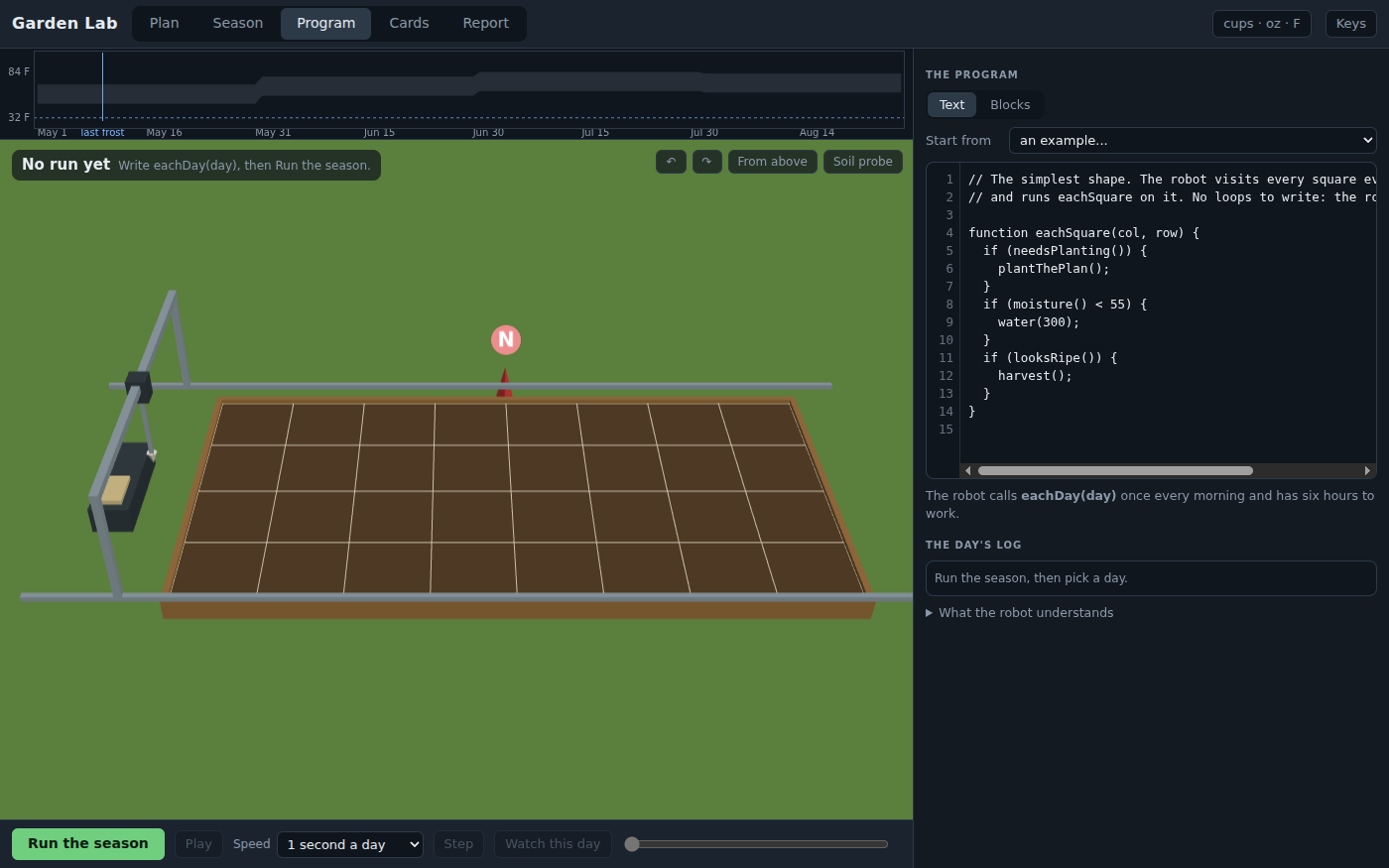
Before the season: an empty bed, a robot on its rails, and a program of fourteen lines. Run the season, and the bed above is what it grew.
What they are learning while they play
Nothing here is presented as a lesson. This is what the activity is made of.
| What the student does | What it is |
|---|---|
| Plants lettuce in May and watches it bolt in the heat | How plants respond to temperature. A plant's growth follows the warmth it collects, counted in growing degree days, and each crop has a temperature it bolts or dies at. The season shows it day by day. |
| Moves the season's start a month earlier and loses the tomatoes to frost | Climate, zones and frost. A zone is about winter and sets the frost dates. The climate decides the rest. Planting is a bet against both, and the lab lets a student lose it safely. |
| Writes a program that waters only when the probe says dry | Sensors and conditionals. The robot reads moisture() and decides. A program that checks before it acts uses less water than a timer, and the Report puts the two side by side. |
| Uses eachSquare instead of eachDay to visit every square | Loops. The robot can be sent square by square, or told to run the same commands on each one. The second is shorter, and the student sees why. |
| Runs the same season by hand, then by robot | Controlled experiments. The weather can be kept the same between runs, so the only difference is the gardener. That is what makes the comparison fair. |
| Tunes a greenhouse program to keep the nights warm without a big bill | Feedback control and tradeoffs. Vents, a heater and shade pull against each other and against the energy bill. Holding a temperature with as little energy as possible is what real control systems do. |
How to tell whether it landed
Ask, and let them show you. A student who has understood it can answer these without help.
- Why did your lettuce bolt, and when would you plant it instead?
- Read me your robot's program. What does it do on a day the soil is already wet?
- Your robot used less water than you did. Did the harvest drop? Why or why not?
- What does your zone decide, and what does your climate decide?
- Why can you compare two runs of the same season fairly?
Use it in your subject
Not a technology class? Then the app is how students show what they learned in your unit. More projects for every subject.
Science
Grow the same crop in three climates with the same plan, chart the harvest and the water used, and explain the differences with temperature and evaporation.
Computer science
Write a robot program that waters by the probe, then one that waters on a timer, and compare them on the Report bench.
Math
Use the season card and the log to work out liters per kilogram of harvest for two plans, and decide which is the better use of water.
Agriculture and CTE
Plan a real bed for your own zone, print the planting calendar, and compare its dates with your local extension service's.
Practical notes
- AgesAges 8 through high school. Younger students plan a bed and tend it by hand; middle schoolers write the robot's first program in blocks; older students write it in code and run the greenhouse.
- TimeA few minutes to a first harvest. A good session is forty-five minutes: a plan, a season by hand, and the same season by robot.
- EquipmentA computer or Chromebook with a modern browser. The bed is 3D, so a very old or very slow computer may struggle. Nothing to install. A printer for the plan and the calendar.
- CostFree. The app has no paid tier.
- PrepNone. Open the page and go. Run the starter plan yourself first; it takes ten minutes.
- In a groupEveryone can run the same season with the same weather, so every harvest on the board is comparable. The growing numbers are rules of thumb, and the lab says which ones.
For co-ops, microschools, and classrooms
Give everyone the same season and see whose robot grows the most on the least water. With a free account the gardens are saved and shared, and a shared garden plays its season back on its page.
Common questions
Is Garden Lab free?
Yes. It runs in your browser and there is no paid tier. A free account adds saving and sharing, but nothing on this page is behind a paywall.
Does my child need an account to try it?
No. The demo on this page is the complete lab. Make a free account to save a garden, share it, and keep the sheets it prints.
How real is the growing?
Some of it is worked out the way growers and irrigation engineers do it: growing degree days for how fast a crop develops, and the Hargreaves formula for how much water the air pulls out. Some of it is rules of thumb fitted to seed packet ranges and common advice, like how much stress costs a plant and when lettuce bolts. The lab lists which is which. Use it to compare plans, and your local extension service for your own garden's dates.
Is there a real robot like this?
Gantry robots that ride over a bed and plant, water and weed do exist, and this one works the same way: it moves to a square, uses a tool, and reads a soil probe and a camera.
How is it different from Aquaponics Lab?
Garden Lab is soil: a grid bed outdoors or in a greenhouse, tended by hand or by a robot. Aquaponics Lab is water: fish and plants in one loop, with the nitrogen moving between them. They share their weather and some crops, but not projects.
What subject can I log this as?
Most families log it as science or agriculture, or computer science when the robot's program is the point. The table above lists specifically what is covered, so you can pick the label your records need and point at the evidence.
Still have a question? Ask us, and a person will write back.
Where to go next
Start with Garden Lab
Trying it costs nothing and takes about five minutes. An account is what makes the work last.
Garden Lab is one of the making apps on the platform. It is a place to make things, not a course, and it is not a substitute for a teacher: it is at its best when an adult asks the questions above and takes the answers seriously.
Page last reviewed October 2026.