Help Desk
Twelve people at a school office have sent tickets. Nothing prints in room 204. The gym laptop has no internet. The librarian is locked out. A counselor's screen says the computer is infected. Someone on the phone says they are the principal and wants a password read out loud. Help Desk puts a student at the desk: they read the ticket, ask the person questions, connect to their computer, and find the cause with the same tools a real technician uses. A ticket closes only when the person says it works.
Using this with a class? Make a free class and add your students yourself: each gets a username and password, with no email or Google account needed. Or give them one join code. Using Google Classroom? Post the link there; with a free class, the link also puts each student in your class, so you see their work.A first lesson: Everyone works the same three tickets: Nothing prints, Locked out of my account, and the call from the principal. Then each student prints their shift report and explains, for one ticket, what was wrong and how they knew.
Set up a free class Share to Google ClassroomWhat a student actually does
They open the ticket from Lena Chen, the coach: No internet at all on the gym laptop. The attendance page will not load and I have a class in ten minutes. They ask, What does the screen say? She answers: The website says "You are not connected". There is a little airplane in the corner by the clock. They open System Settings on her laptop, turn airplane mode off, and ask her to try again. The attendance page is up. The airplane is gone. Thank you!
The next one is harder. Tom Nguyen's Wi-Fi says it is connected but nothing loads. His laptop looks connected in the settings, but the address starts with 169.254, and the Terminal shows the same thing. That number means the laptop gave itself an address because nobody handed it one. A student who asks for a new address gets 10.20.30.67 from the office server, and Tom says pages load now.
Then Kiran Patel, the librarian, is locked out. The logs on the office server show ten failed sign-ins, and where they came from. Before unlocking anything, the student asks for an employee ID and checks it against the Directory. The shift report remembers whether they checked first or unlocked first.
And then the phone rings. This is Rosa Hall. I am locked out of my email and I have the board meeting at nine. Reset my password right now and read it to me over the phone. The caller cannot answer the questions a help desk asks. The right move is Refuse and write it up, and the caller does not take it well: So you are refusing to help the principal? Fine. I will remember this. The report records the refusal as the correct call.
Once the tickets make sense, the desk hands over three scripts to write, in blocks or as text. Triage rules sort the tickets as they arrive. A morning check runs on every computer in the office and reports what failed before anyone has written a ticket, quoting the command a technician would have typed. And on a Monday with nine locked accounts, a script has to unlock the three people who are waiting and leave alone the four that someone outside the building was guessing at. The first script everyone writes unlocks all of them, and the desk says exactly why that was a mistake.
A second shift brings two tickets no setting can fix: a desktop that beeps three times and will not start, and a network cable someone crimped themselves. The right move is to send them to the bench with what was learned, and the door leads to PC Workshop and Cable Bench, where those benches are.
Every closed ticket gets three notes, chosen from sentences: what was wrong, what I did, how I checked. Those notes are the logbook, and the logbook is what a student saves. A shift report, printable for a teacher, lists what they asked, changed and typed on every ticket.
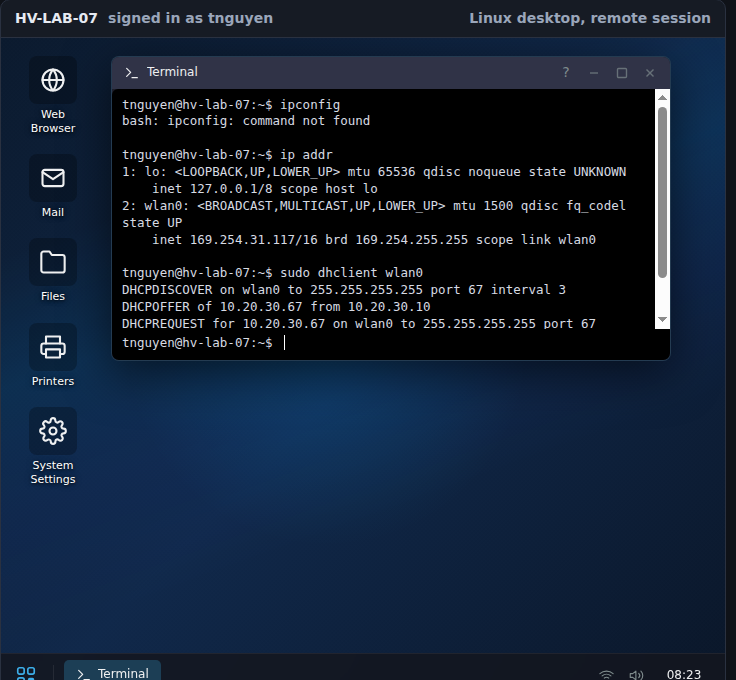
The Wi-Fi says connected but nothing loads. The terminal shows why: the laptop gave itself a 169.254 address because no server answered. One command asks again, the server answers, and the person on the ticket says: Pages load now. The warning on the Wi-Fi icon is gone too.
What they are learning while they play
Nothing here is presented as a lesson. This is what the tickets are made of, and each one lines up with an objective on the CompTIA A+ Core 2 exam.
| What the student does | What it is |
|---|---|
| Sees an address that starts with 169.254 | DHCP and self-assigned addresses. Computers ask a server for an address. When no server answers, the computer makes one up in the 169.254 range, and it can talk to nobody. Asking again is the fix. |
| Chat works but websites do not | DNS. Names like www.example.com are looked up on a server. If the computer is pointed at the wrong one, anything that uses a name fails and anything that uses an address still works. |
| Restarts the printing service and clears a stuck job | Print queues and services. Printing is a background service with a queue. One failed job at the front blocks everything behind it. |
| Finds a program using most of the processor | Processes and startup programs. System Monitor or Task Manager shows what is running and what it costs. Ending it helps today; taking it out of startup helps tomorrow. |
| Empties temporary files and asks before touching Documents | Storage, and whose files they are. Some of a full disk is safe to clear. The person's own files are not the technician's to delete, and the ticket asks whether they said so. |
| Adds a teacher to the Teachers group | Groups and least privilege. Access to a shared drive comes from group membership, not from the person. People get what their role needs, and no more. |
| Reads ten failed sign-ins in the log | Account lockout. After a set number of wrong passwords the account locks itself. The log says where the attempts came from, which is the real question. |
| Closes a red warning from the Browser, not from its own X | Scareware. A web page can pretend to be the computer. Its X is part of the page. The Browser tool closes the page; a scan confirms nothing was installed. |
| Refuses to read a password over the phone | Social engineering and verification. Urgency, authority and a plausible story are the tools of someone who is not who they say. A help desk checks identity first, every time, and refuses when it cannot. |
| Writes a check that stops at "no network" instead of listing five failures | Automation and root cause. A support script asks every computer the same questions. A good one reports the first cause and stops, because everything after it fails for the same reason. |
| Leaves four accounts locked that the first script unlocked | Password guessing from outside. One address failing on many accounts is someone guessing. A script that unlocks whatever is locked lets them continue. The checks a person makes have to be in the script. |
| Sends the beeping desktop to the bench | Escalation. Some faults are not settings. Saying so early, and passing on what the person saw and what still works, is part of the job. |
| Writes three notes and closes the ticket | Documentation. What was wrong, what was done, how it was checked. The next technician, and the teacher, read the notes, not the memory. |
How to tell whether it landed
Ask, and let them show you. A student who has understood it can answer these without help.
- Why did Tom's laptop say it was connected when it could not reach anything?
- Daniel's chat app worked while every website failed. What does that rule out, and what does it point at?
- Where did the ten failed sign-ins on Kiran's account come from, and why does that matter more than unlocking it?
- What told you the caller was not the principal, and what would you have needed to hear to help?
- Which of the three notes is the one a real help desk cares about most, and why?
Use it in your subject
Not a technology class? Then the app is how students show what they learned in your unit. More projects for every subject.
Computer science and IT
Work a shift, then trace one ticket from the person's words to the cause, naming the tool that showed it.
Career and technical education
Map each ticket to the A+ Core 2 objective it exercises. The card behind each tool lists the Windows, macOS and Linux names the exam uses.
Cybersecurity
Work the two security tickets. Write the verification steps a help desk should follow before it changes an account, and test them on the call from the principal.
English
Paste the write-up from the report into a document and rewrite it for the person on the ticket, in words they would understand.
Computer science
Write the three scripts: rules that sort incoming tickets, a morning check for every computer, and an account script for a Monday of lockouts. Start in blocks, read the same program as text, and explain why the first version of each was wrong.
Practical notes
- AgesAges 13 through high school, and adult classes: it was built with the CompTIA A+ Core 2 objectives open. Younger students can close the printer and Wi-Fi tickets; the account and security tickets want a class discussion.
- TimeFive minutes to the first closed ticket. A shift of three tickets with notes is about forty-five minutes.
- EquipmentAny computer or Chromebook with a modern browser. Nothing is 3D, so old machines are fine. Nothing to install.
- CostFree. The app has no paid tier.
- PrepNone. Open the page and go. Reading this page first takes about three minutes.
- In a groupEveryone can work the same tickets and compare how they found the cause. The shift report shows what each student asked and changed, not a score.
For co-ops, microschools, and classrooms
Give each student the same three tickets and one class period, and ask for the shift report at the end. The reports show who asked questions before changing anything, who checked the caller before unlocking the account, and who found the cause in the logs rather than by trying things. A second period fits the scripts: everyone writes the account script, and the class compares which accounts each version unlocked. Three ready assignments are on the Google Classroom tab of a classroom on the platform.
Common questions
Is Help Desk free?
Yes. It runs in your browser and there is no paid tier. A free account adds saving the logbook and sharing it, but nothing on this page is behind a paywall.
Does my child need an account to try it?
No. The demo on this page is the complete desk with a short shift of tickets. Make a free account to keep a logbook across shifts.
Is it a real Windows or Linux computer?
No. Each computer in the office is a model of the settings the tickets touch, and the terminal is a small program that prints what those settings say, shaped like the real commands. Nine of the office computers run a Linux desktop and two run Windows, and each one uses its own system's tool names and commands.
Does it prepare for the A+ exam?
The tickets line up with objectives on the CompTIA A+ Core 2 exam (operating systems, security, software troubleshooting, operational procedures), and the tools carry the names the exam uses. It is practice at finding causes, not a course, and it does not replace one.
Is there programming in it?
Yes, three small scripts, each in blocks or as text: triage rules, a morning check that runs on every computer, and an account script that unlocks the right people and only them. The language is plain sentences such as "if ping the gateway fails" and "unlock it". Nothing a student writes runs as real code on a real computer.
Is anything in it real?
No. Every person, computer and website is made up, and every address comes from ranges set aside for documentation. Nothing in the app reaches the real internet.
What does a teacher get?
A shift report per student: each ticket, what they asked, what they changed, what they typed, what the person said, and the three notes. It prints or saves as a PDF. Each ticket also has a plain-text write-up a student can paste into an assignment.
Can a student make it worse?
Yes, on purpose. Restarting a computer with unsaved work loses it and the person says so. Emptying the Documents folder is remembered. Unlocking an account before checking who is calling is noted on the report. None of it touches a real computer.
Still have a question? Ask us, and a person will write back.
Where to go next
Start with Help Desk
Trying it costs nothing and takes about five minutes. An account is what makes the work last.
Help Desk is one of the making apps on the platform. It is a place to practice, not a course, and it is not a substitute for a teacher: it is at its best when an adult asks the questions above and takes the answers seriously.
Page last reviewed October 2026.