Mesh2Motion
A 3D model is only a surface. Before it can walk, someone has to put a skeleton inside it and tell every point on that surface which bone to follow. Game and film studios call this rigging. Mesh2Motion does it in the browser: load a model, fit a skeleton, drag the joints into place, then pick from a library of ready-made animations. It opens on a fox that is already rigged, with Idle, Walk and Run picked. Click one and the fox moves. Free, in the browser, no account needed to try it.
Using this with a class? Make a free class and add your students yourself: each gets a username and password, with no email or Google account needed. Or give them one join code. Using Google Classroom? Post the link there; with a free class, the link also puts each student in your class, so you see their work. mytekDev is also available from the Google Workspace Marketplace, so your school's Google admin can install it for everyone.A first lesson: Everyone rigs the same fox. Half the class drags one knee joint well out of place before pressing Finish, the other half leaves it alone, then both play Walk and explain what went wrong with the leg and why.
Set up a free class Share to Google ClassroomWhat a student actually does
They click Walk and the fox walks in place. The scrubber under the view steps through it frame by frame, and the bone button beside it shows the skeleton moving inside the body. Then they press Back to reach the skeleton, drag a knee joint up into the hip, press Finish, and play Walk again. The leg now folds in the wrong place, which is the fastest way to see what the joints are for. Ctrl+Z undoes a joint move, and Change Model goes back to the start from any step.
From there it is the full tool. Students upload their own model as GLB or FBX, or a ZIP holding GLTF or DAE files with their textures, or pick one of the reference models. They turn it to face front, drop it onto the floor, and choose one of eight skeleton templates: human, fox, bird, dragon, kaiju, spider, snake or fish, with finger options for the human hand. Joints can be dragged inside the model or moved with arrow handles, left and right can mirror each other, and a Weights view shows which part of the surface each bone controls. The animation library has more than a hundred clips for the human skeleton and a smaller set for each animal, each with a looping preview. The checked animations download together as one GLB file with the skeleton and the model, and in an account that file goes into the student's files.
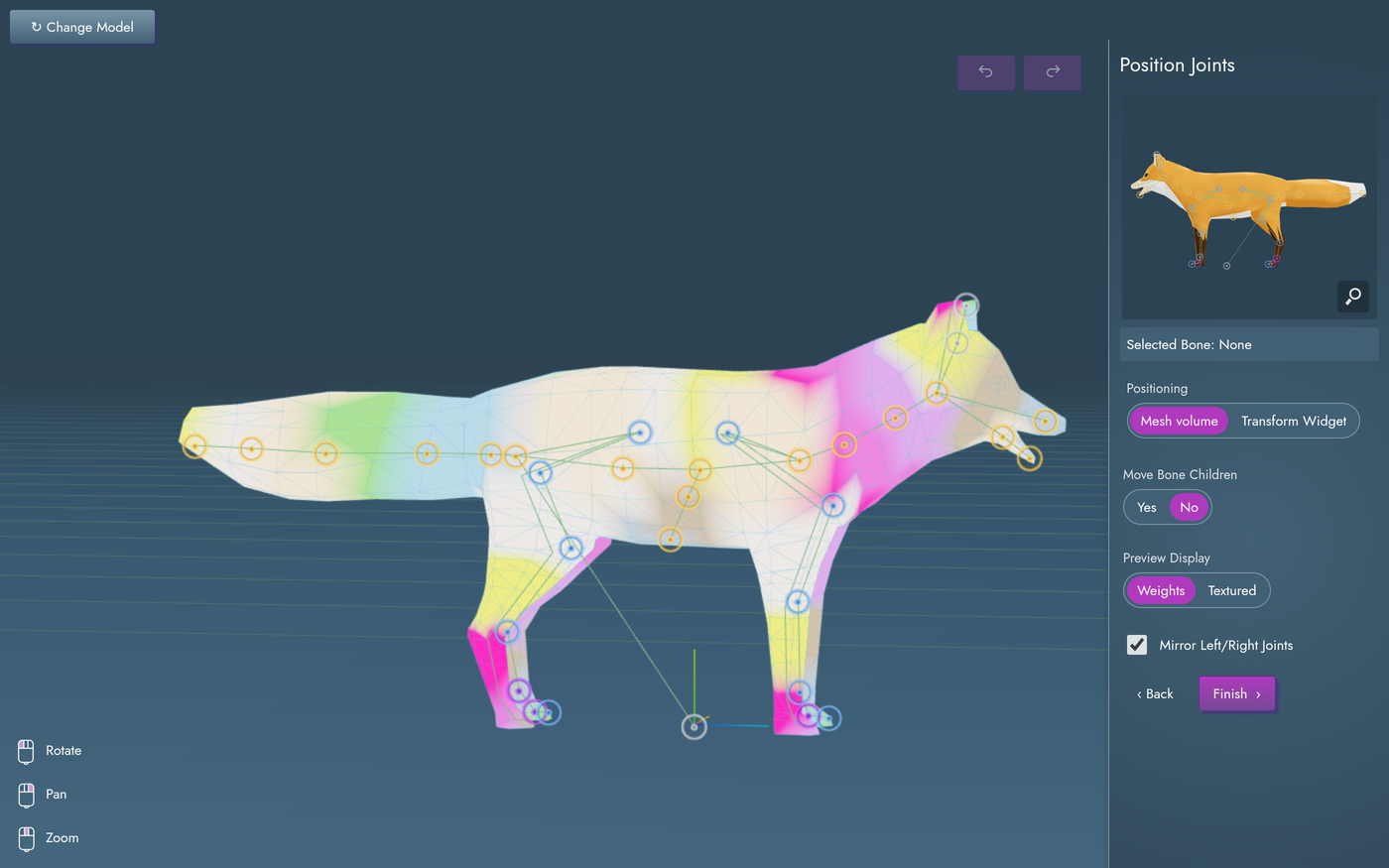
Each color is the part of the surface that one bone will carry. The app works this out on its own: every point on the fox goes to the nearest bone, the edges between bones are smoothed, and each point's shares add up to one. Drag a joint and the colors are worked out again when the mouse lets go, so a student can watch the patches shift when a knee is put in the wrong place. With Mesh volume on, a dragged joint lands halfway between where the mouse ray enters the body and where it leaves, so it ends up inside the leg instead of on its skin.
What they are learning while they play
Nothing here is presented as a lesson. This is what the activity is made of.
| What the student does | What it is |
|---|---|
| Turns the fox around before the skeleton goes in | Meshes and vertices. A 3D model is a shell of points, called vertices, joined into triangles. There is nothing inside it and nothing that can bend until a skeleton is added. |
| Picks the Fox skeleton template | Skeletons and bones. A rig is a set of invisible bones. Animations move the bones, and the bones move the surface. Different animals need different skeletons. |
| Drags a hip joint with Move Bone Children set to Yes | Joints and hierarchy. Every bone has a parent. Move or turn the hip and the knee, ankle and foot below it come along, the way a family tree branches. |
| Switches Preview Display to Weights | Skinning and weights. Each vertex is told how much to follow each nearby bone. Where two bones meet the shares are blended, so the surface bends instead of tearing. |
| Leaves Mirror Left/Right Joints checked | Symmetry. Most bodies are the same on both sides. Place the left leg's joints and the right leg's follow, mirrored across the middle. |
| Drags the scrubber while Walk plays | Keyframes. An animation is stored as poses for each bone at moments in time. The computer fills in the frames between them, which is why one walk can be reused on any model with the same skeleton. |
| Uploads an FBX and downloads a GLB | 3D file formats. GLB packs the mesh, textures, skeleton, weights and animations into one file that game engines and web pages can read. FBX is an older format many tools still use. |
| Sets Exported Bone Names to Mixamo | Naming conventions. Tools find bones by name. Using a naming scheme other tools expect is what lets a file move from one program to another and still work. |
How to tell whether it landed
Ask, and let them show you. A student who has understood it can answer these without help.
- The fox already had a shape. Why could it not walk until it had a skeleton?
- You moved the knee joint up into the hip. What happened when it walked, and why?
- What do the colors in the Weights view show?
- Why can the human animations not be used on the fox?
- What is inside the GLB file you downloaded?
Use it in your subject
Not a technology class? Then the app is how students show what they learned in your unit. More projects for every subject.
Science
Put a picture of a real fox, bird or snake skeleton beside the template, then move the joints to where the real animal's joints are and compare how it walks or flies.
Art and media
Build or find a character, rig it, and pick three animations that show its personality, then explain which parts of the body each one moves most.
Computer science
Draw the fox's bones as a tree, parent above child, and predict which bones move when the hip turns. Then check the prediction with Move Bone Children in the app.
Practical notes
- AgesAges 11 through high school. Younger students can load a reference model and pick animations; placing joints on their own model suits older ones.
- TimeUnder a minute to see the fox walk. Rigging a model of their own, from upload to download, takes thirty to sixty minutes the first time.
- EquipmentA computer or Chromebook with a modern browser and 3D graphics (WebGL). A mouse with a right button and a scroll wheel makes the 3D view much easier: left drag turns, right drag pans, the wheel zooms. Nothing to install.
- CostFree. The app has no paid tier.
- PrepNone. Open the page and go. Reading this page first takes about three minutes.
- In a groupEveryone can start from the same fox, so a whole class works from one starting point and compares what moving each joint did.
For co-ops, microschools, and classrooms
Give everyone the same model and one joint to get wrong on purpose. The broken walks that come back are different, and each student can point at the joint that caused it, which turns an invisible idea, bones inside a surface, into something the class can see and argue about.
- Eight skeleton templates, from human to snake, with a library of ready-made animations for each.
- Students can rig their own GLB or FBX models, not only the samples.
- Finished models download as GLB, saved into the student's files.
- No install, no per-seat license. Student work is private by default.
Common questions
Is this the original Mesh2Motion?
It is Mesh2Motion, the open-source rigging tool by Scott Petrovic and contributors. The code is under the MIT license, and the models, rigs and animations that come with it are CC0, free for anyone to use. This is our hosted copy, not mesh2motion.org. Our build adds saving a project to a free account, which keeps the model, the skeleton, the joint positions and the animations picked, so a student can come back to it. Downloads go into the student's files on the platform. We also added a Change Model button, a short how-it-works list on the first screen, and took out the dialog after a download that linked to outside sites.
Do I need to download anything?
No. It runs in the browser on Chromebooks, Windows, Mac and Linux. There is nothing to install.
Is it only for students?
No. It is a working rigging tool for anyone with a 3D model to animate. Much of this page is written for teachers and parents because many of the people who use it are students.
Is it like Mixamo?
It does a similar job: put a skeleton inside a character and apply ready-made animations to it. Mixamo is an Adobe product, and Mesh2Motion is a separate open-source project with no connection to Adobe. Mesh2Motion has animal skeletons as well as a human one, and the download can name the bones the way Mixamo does, for tools that expect those names.
Is it free?
Yes. It runs in your browser and there is no paid tier. A free account adds saving and keeping downloaded models, but nothing on this page is behind a paywall.
Does my child need an account to try it?
No. The demo on this page is the complete app with the fox loaded, and a student can upload a model of their own in it too. Saving and downloading the finished GLB need a free account, and the work comes with you as your first project.
Can it rig any model?
It works best on a model shaped like one of the eight skeletons: a person, a four-legged animal, a bird, a dragon, a kaiju, a spider, a snake or a fish. Upload GLB or FBX, or a ZIP holding GLTF or DAE files with their textures. A saved project keeps an uploaded model up to a few megabytes; a bigger one saves everything except the model itself.
Can they make their own animations?
Not in this app. Mesh2Motion is a rigging tool: students choose from its animation library, or import GLB animations made for Mesh2Motion's skeletons. To set keyframes by hand, use MotionMaker.
What ages is it for?
Ages 11 through high school. Loading a reference model and picking animations works for younger students; fitting a skeleton to their own model suits older ones.
Is their work public?
No. Projects are private by default. A student can choose to share one, and in a class the teacher can see students' projects.
What subject can I log this as?
Most families log it as art and media or computer science. Rigging and animation are digital art, bone hierarchies and file formats are computer science, and comparing a template with a real animal's skeleton is life science. The table above lists specifically what is covered, so you can pick the label your records need and point at the evidence.
Still have a question? Ask us, and a person will write back.
Where to go next
Start with Mesh2Motion
Trying it costs nothing and takes about five minutes. An account is what makes the work last.
Mesh2Motion is one of the making apps on the platform. It is a place to make things, not a course, and it is not a substitute for a teacher: it is at its best when an adult asks the questions above and takes the answers seriously.
Mesh2Motion is by Scott Petrovic and contributors. The code is used under the MIT license, and the bundled models, rigs and animations are CC0. Source.
Page last reviewed October 2026.
Google, Google Classroom and Chromebook are trademarks of Google LLC.