Night Watch
Students who love survive-the-night games want to make one, and Night Watch lets them. They paint a building on a grid, a pizza arcade, a school after dark, an old house or a ship. They place the cameras and the doors, put creatures in the rooms, and write the small program each creature runs: where it goes, when it waits, what makes it stop. Then they publish the night. A friend sits in the office with a tablet of cameras, two doors and not enough power, and has to last until 6 AM. Nobody is ever hurt: a creature that reaches the office catches the player, the night ends, and they try again.
Using this with a class? Make a free class and add your students yourself: each gets a username and password, with no email or Google account needed. Or give them one join code. Using Google Classroom? Post the link there; with a free class, the link also puts each student in your class, so you see their work.A first lesson: Everyone opens The Boardwalk Arcade and plays one night. Then each student changes one creature's program so it is harder to survive but still fair, which means the player can learn its tell. Swap computers and play each other's nights. The class decides which change made the best night, and why fair is scarier than random.
Set up a free class Share to Google ClassroomWhat a student actually does
They start from one of four templates, The Boardwalk Arcade, School After Dark, The Old House or The Ship, or from an empty lot. On the House tab they paint the building on a grid with floor, wall, vent and office tiles. Rooms are found in what they paint, and each one says how far it is from the office, which is how loud a creature in it sounds. They place cameras, and a room with no camera is a blind spot. Moving one wall changes every route through the building.
On the Creatures tab they add the things that move. There are seven kinds: the Stalker, the Runner, the Hider, the Watcher, the Mimic, the Crawler and the Wanderer. Every kind has a tell, something a careful player can notice, and a counter, something a player can do about it. The Watcher only moves when nobody is looking at it, so the camera that keeps the player alive is the thing that lets it come. The rule the lab teaches is the one good game designers follow: a creature a player cannot learn is not scary, it is unfair.
On the Brains tab they write the programs. Every creature runs one, and so do the night itself, which decides when things get harder, and the house, which can flicker a light or slam a door. A fourth program is the watchman, written by whoever plays: a program that plays the shift for them, so a student can find out whether their own rules would survive their own house. Each one can be written as blocks in a Glassbox drawer or as code. On the Nights tab each night gets its own table, how long an hour lasts, how much power there is and how hard each creature comes, and later nights should be harder.
Then they play it, and publish it. On the House tab the author decides how the player spends the night: sitting at the desk until 6 AM, or walking the house room to room, where batteries are out there to find and the creatures may follow. Either way, the player flips between cameras with the number keys, shuts the doorway they face with Space, turns lights on room by room and listens. Everything costs power, and when the power runs out the doors open and the cameras go dark. A night is seeded, so it plays back exactly the same, and a record of who survived is checked by replaying the night, not taken on trust.
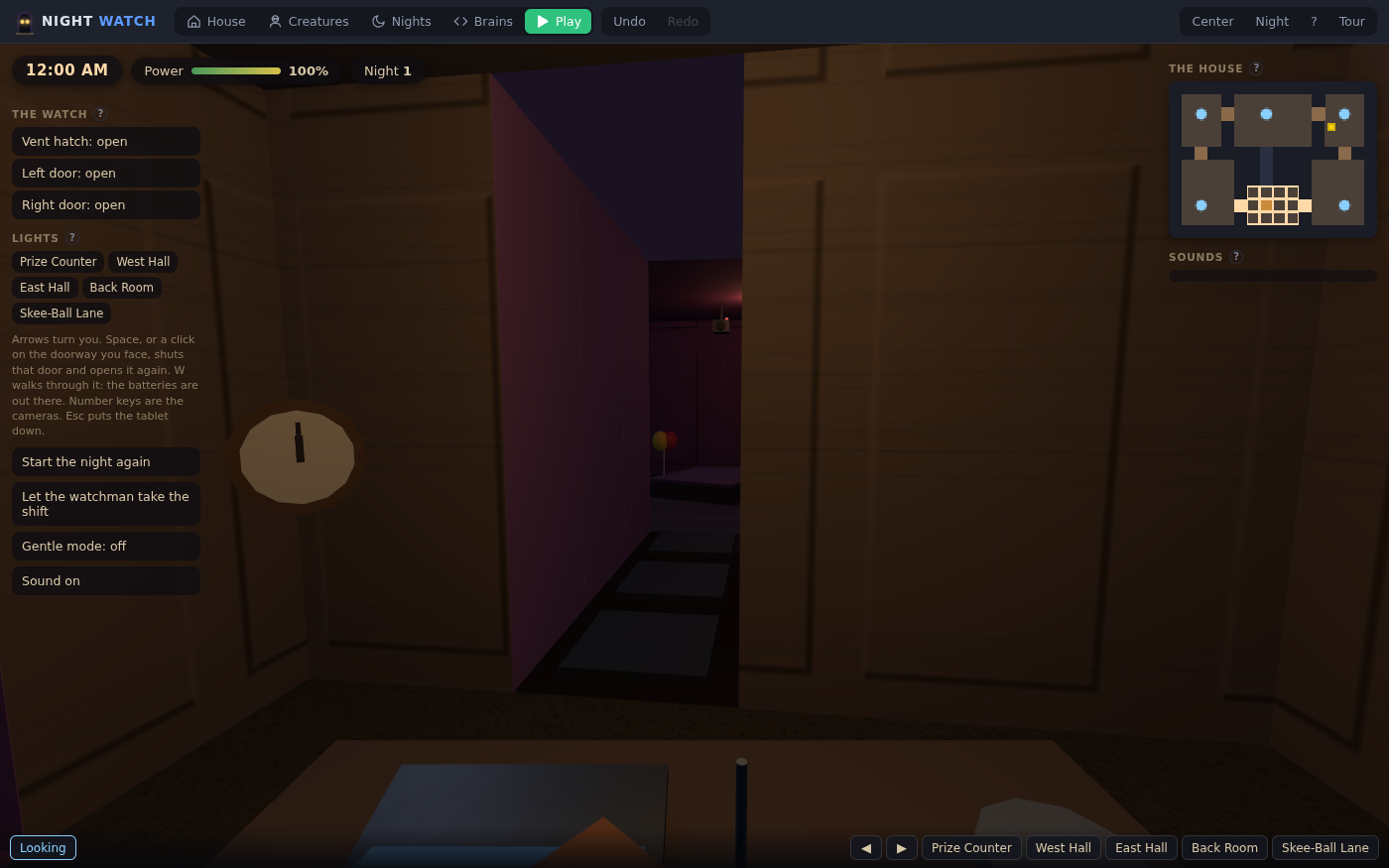
Midnight, with all the power still left. The map shows where the cameras are and the buttons along the bottom switch between them; the doors and lights cost power. Gentle mode is the player's, and turns the scares down.
What they are learning while they play
Nothing here is presented as a lesson. This is what the activity is made of.
| What the student does | What it is |
|---|---|
| Writes where a creature goes and what makes it wait | Conditionals and state. A creature's program is a handful of if-statements about where it is, where the player is looking and what it did last. Small changes make a very different creature. |
| Moves a wall and watches every creature take a new route | Graphs and pathfinding. The rooms and doors are a graph. Creatures walk the shortest way to the office, so the floorplan is the level design and the algorithm at the same time. |
| Gives a creature a tell and a counter, then tests whether a friend can learn it | Game design and fairness. A good scare is learnable. The student designs a pattern, tests it on a real player, and changes it when the player could not have known. |
| Runs out of power at 4 AM and redesigns the night | Resource management and balancing. Cameras, lights and doors all cost power. Tuning a night so it is hard but winnable is balancing, the same work real game designers do with numbers. |
| Writes a watchman that plays the shift by itself | Automation and testing. A program that plays the game is a test of the game. If the watchman always wins, the night is too easy; if it never can, it may be unfair. |
| Plays a night twice and sees it go exactly the same way | Randomness and seeds. The randomness is seeded, so the same night with the same moves plays out the same. That is how a record can be checked, and how a bug can be found again. |
How to tell whether it landed
Ask, and let them show you. A student who has understood it can answer these without help.
- What is your creature's tell, and what is its counter? Could a new player learn them in one night?
- Read me your creature's program. What does it do when the player is looking at it?
- You moved a wall and the night got easier. Why?
- What does your watchman do when the power gets low? Does it survive your night?
- Why is a creature that moves at random less scary than one with a pattern?
Use it in your subject
Not a technology class? Then the app is how students show what they learned in your unit. More projects for every subject.
Computer science
Write one creature's program, then a watchman that beats it. Explain each program's if-statements, and what the watchman had to notice to win.
Game design
Design a night with three creatures, each with a different tell. Playtest with two classmates, write down where they got caught, and change one thing.
English language arts
Write the story of the building: who works the night shift, what the creatures are, why nobody stays past 6 AM. Then build the house the story describes.
Math
Work out the power budget: how long the doors can stay shut, how many camera checks an hour the power allows, and what changes if an hour lasts longer.
Practical notes
- AgesRecommended for ages 10 and up. Younger students can play and paint a house; writing creature programs suits middle school and up. Gentle mode is the player's choice and turns the scares down.
- TimeTen minutes to play a night and change something. A good session is forty-five minutes: a house, a creature with a program, and a friend to test it.
- EquipmentA computer or Chromebook with a modern browser, and headphones: sound is half the game. The house is 3D, so a very old or very slow computer may struggle. Nothing to install.
- CostFree. The app has no paid tier.
- PrepNone. Open the page and go. Play one night yourself first, so you know what the students will feel.
- In a groupStudents publish nights for each other. Every record is checked by replaying the night, so a high score is a real one.
For co-ops, microschools, and classrooms
Make it a swap: everyone builds a night, then plays someone else's. With a free account the nights are saved and shared, and each night's page keeps who survived it, checked by replaying the night.
Common questions
Is Night Watch free?
Yes. It runs in your browser and there is no paid tier. A free account adds saving and sharing, but nothing on this page is behind a paywall.
Is it too scary for my child?
It is meant to be tense, not gory. The kit has no gore in it to build with; a player is caught, never killed, and the night simply ends. The scare setting stops at Startle and the sound of a scare is capped in code. Gentle mode belongs to the player, so a child who opens a friend's night can turn the scares down. We recommend it for ages 10 and up.
Does it flash?
Lights can flicker, but the flicker rate is limited in the game itself and no author can raise it. That is a safeguard, not a medical guarantee; a student who is sensitive to flashing light should use it with care.
Does my child need an account to try it?
No. The demo on this page is the complete maker with a template loaded. Make a free account to save a night, publish it, and see who survived it.
Is this a copy of a famous game?
It is a maker for the kind of game where you survive a night watching cameras, a genre many students already love. Everything in it, the houses, the creatures and their names, is its own, and students build their own nights.
What does "program a creature" mean?
Each creature runs a small program that decides where it goes next and when it waits, using what it can see: which room it is in, where the player is looking, whether a door is shut. It can be written as blocks or as code. The night and the house have programs too, and a player can write a watchman that plays the shift for them.
What subject can I log this as?
Most families log it as computer science or game design. The table above lists specifically what is covered, so you can pick the label your records need and point at the evidence.
Still have a question? Ask us, and a person will write back.
Where to go next
Start with Night Watch
Trying it costs nothing and takes about five minutes. An account is what makes the work last.
Night Watch is one of the making apps on the platform. It is a place to make things, not a course, and it is not a substitute for a teacher: it is at its best when an adult plays a night too and asks the questions above.
Page last reviewed October 2026.