nunuStudio
A 3D game is a scene of objects, a light or two, a camera to look through, and code that changes them a little every frame. nunuStudio is an editor where all four are out in the open. It opens on a small grassy scene with a blue cube, a spinning arm and one short script. Press Run, drive the cube with the arrow keys, then open the script and change how it moves. Free, in the browser, no account needed to try it.
Using this with a class? Make a free class and add your students yourself: each gets a username and password, with no email or Google account needed. Or give them one join code. Using Google Classroom? Post the link there; with a free class, the link also puts each student in your class, so you see their work. mytekDev is also available from the Google Workspace Marketplace, so your school's Google admin can install it for everyone.A first lesson: Everyone runs the same scene, then changes one number in the script and one setting in the Inspector, and the class guesses what each person changed by watching it run.
Set up a free class Share to Google ClassroomWhat a student actually does
They press Run, click the scene, and drive the blue cube around the grass with the arrow keys while the arm spins. It drives straight off the edge, because nothing stops it. They press Stop, double-click controls in the Project Explorer, and find the update function, where speed = 4 and spinner.rotation.y += 1.5 * delta live. They change the numbers, press Run again and see the difference. Clicking any object shows its Position, Rotation and Scale in the Inspector, and the move, rotate and scale tools let them drag it in the scene instead.
From there it is the real nunuStudio, the open-source three.js editor. The column of icons beside the scene adds shapes, lights, cameras, physics objects, text, particles and new scripts, in JavaScript or Python. Dragging an object onto another in the Project Explorer makes it a child, materials and textures are edited in their own tabs, and the Console shows what a script prints and where it broke. With a free account the project saves, File > Import from Assets brings in a 3D model from the student's files, and File > Export writes the scene out as OBJ, GLTF, GLB or STL.
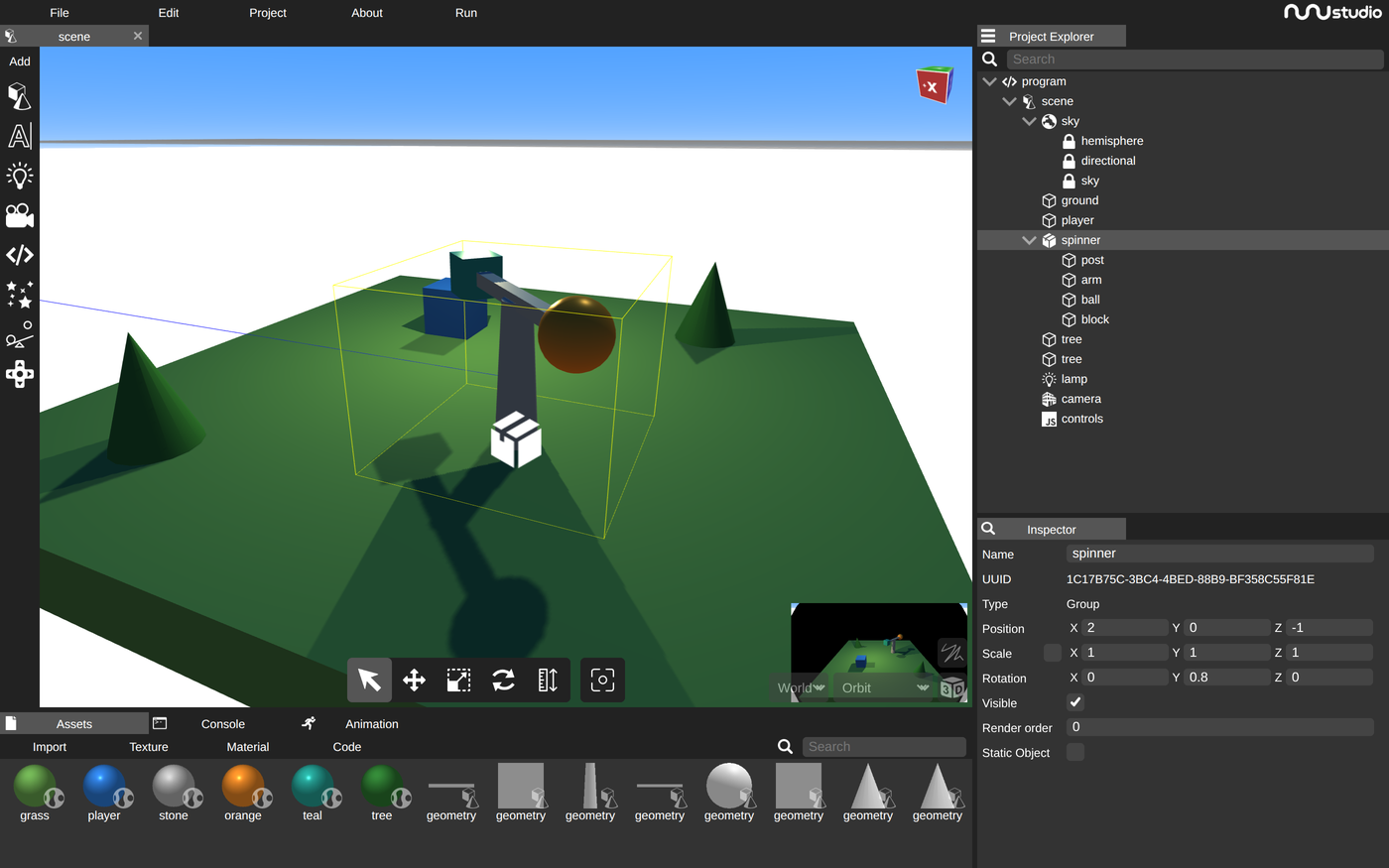
One number, typed into one object. spinner is an empty group, and its rotation was changed from 0 to 0.8. The post, the bar, the ball and the block were not touched, yet all four turned, because they are its children and a child moves with its parent. The script uses the same idea: it only ever turns spinner, and everything inside goes along. Rotation here is in radians, so 0.8 is a little under an eighth of a turn.
What they are learning while they play
Nothing here is presented as a lesson. This is what the activity is made of.
| What the student does | What it is |
|---|---|
| Types new numbers into the cube's Position | 3D coordinates. Every position is three numbers. x runs left and right, y runs up and down, and z runs toward and away from the viewer. |
| Turns spinner and watches the ball go with it | Parent and child objects. A scene is a tree. A child's position is measured from its parent, so moving or turning the parent carries every child along. |
| Changes the cube's color and roughness | Materials. A material decides how a surface answers light: its color, and whether it looks shiny or dull. |
| Moves the lamp or changes its color | Lights. Nothing in a 3D scene has a color you can see until light reaches it. Moving a light moves the bright sides and the shadows. |
| Presses Run and sees the scene from a new angle | Cameras. The editor view is for building. When the game runs, what appears on screen is whatever the camera object is pointed at. |
| Changes speed = 4 in update(delta) | The update loop. A game redraws many times a second and runs update before each one. Multiplying by delta, the time since the last frame, keeps the speed the same on fast and slow computers. |
| Holds an arrow key to drive the cube | Input. Each frame the script asks whether a key is down and acts on the answer. Holding the key keeps the answer yes. |
| Changes 1.5 to 6.28 in the spin line | Radians. Rotation is measured in radians, and a full turn is about 6.28 of them, so 6.28 * delta is one turn every second. |
How to tell whether it landed
Ask, and let them show you. A student who has understood it can answer these without help.
- The script only turns spinner. Why does the orange ball go around too?
- The ball's Position says x is 1.5, but spinner sits at x = 2. Where is the ball in the world, and why?
- The cube can drive off the grass. Which lines would you change to stop it at the edge?
- What would happen on a slow computer if the script added a fixed 0.1 every frame instead of using delta?
- When you press Run, which object decides what you see?
Use it in your subject
Not a technology class? Then the app is how students show what they learned in your unit. More projects for every subject.
Computer science
Read the update loop line by line, then add a jump with the space bar or a second object that follows the cube.
Math
Work out where a child object sits in the world from its parent's position, and convert a spin rate from radians per second into turns per minute.
Physics
Use speed times time equals distance to predict how far the cube travels in three seconds of holding a key, then run it and check.
Practical notes
- AgesAges 12 through high school. Younger students change numbers, colors and positions; older ones write their own scripts and build small games.
- TimeA minute to the first run. A small game of their own, such as collecting objects or dodging something that moves, takes one to two class periods.
- EquipmentA computer or Chromebook with a modern browser, 3D graphics (WebGL) and a keyboard. A mouse helps for moving things in the scene. Nothing to install.
- CostFree. The app has no paid tier.
- PrepNone. Open the page and go. Reading this page first takes about four minutes.
- In a groupEveryone can start from the same scene and script, so a class works from one shared starting point and compares what each change did.
For co-ops, microschools, and classrooms
Hand everyone the same scene and one change to make, such as stopping the cube at the edge of the grass. The answers come back as different lines of code that each work, and every student can point at the line that made the difference, which makes the thinking easy to see and easy to check.
- The real nunuStudio editor: scene view, Project Explorer, Inspector and code editor.
- Scripts in JavaScript, with Python available too.
- Exports OBJ, GLTF, GLB and STL, and imports 3D models from the student's files.
- No install, no per-seat license. Student work is private by default.
Common questions
Is this the original nunuStudio?
It is nunuStudio, the free and open-source 3D editor by tentone and its contributors, built on three.js and released under the MIT license. This is our hosted copy, not the official nunuStudio site. Our build adds saving to a free account, a File > Import from Assets option that brings in a 3D model from your files, and example projects to start from. It leaves out the editor's own New, Save, Load and Publish options, since saving goes through the platform instead.
Do I need to download anything?
No. It runs in the browser on Chromebooks, Windows, Mac and Linux, with nothing to install. It does need a browser and computer with 3D graphics (WebGL), which nearly every current one has.
Is it only for students?
No. It is a full 3D scene and game editor for anyone. Much of this page is written for teachers and parents because many of the people who use it are students.
Is it free?
Yes. It runs in your browser and there is no paid tier. A free account adds saving, but nothing on this page is behind a paywall.
Does my child need an account to try it?
No. The demo on this page is the complete editor with the starter scene loaded. Saving and importing models from your files need a free account, and the scene you changed comes with you as your first project.
Do they need to know how to code first?
No. A lot can be built without code: placing objects, changing colors, adding lights and moving the camera. The starter script is short, and changing one number in it and pressing Run shows what that line does. Students who have written some JavaScript will move faster.
What ages is it for?
Ages 12 through high school. It is a real editor with a lot of panels, so younger students do best changing the starter scene; older ones write scripts and build their own games.
Is their work public?
No. Projects are private by default. A student can choose to share a project, and in a class the teacher can see students' projects.
What subject can I log this as?
Most families log it as computer science. Scripts, the update loop and keyboard input are programming, coordinates and radians are math, and speed and distance are physics. The table above lists specifically what is covered, so you can pick the label your records need and point at the evidence.
Still have a question? Ask us, and a person will write back.
Where to go next
Start with nunuStudio
Trying it costs nothing and takes about five minutes. An account is what makes the work last.
nunuStudio is one of the making apps on the platform. It is a place to make things, not a course, and it is not a substitute for a teacher: it is at its best when an adult asks the questions above and takes the answers seriously.
nunuStudio is by tentone and contributors, used under the MIT License. It is built on three.js. Source.
Page last reviewed October 2026.
Google, Google Classroom and Chromebook are trademarks of Google LLC.