Shirt Lab
A shirt is a front, a back, two sleeves and a few decisions: how long, how loose, how deep the neck. Shirt Lab lets students make those decisions on a 3D shirt, from a T-shirt or a tank top to a basketball, football or hockey jersey, a polo or a hoodie. They paint it, put a name and a number on it, size it for a real chest, and take it out of the lab as a picture, a design sheet, a sewing pattern printed at real size, a file for a 3D printer, or a model for a game.
Using this with a class? Make a free class and add your students yourself: each gets a username and password, with no email or Google account needed. Or give them one join code. Using Google Classroom? Post the link there; with a free class, the link also puts each student in your class, so you see their work.A first lesson: Everyone measures a chest with a tape, sets that size in Shirt Lab, and designs a team jersey with a made-up team name and a number. Then each student prints one page of the sewing pattern and checks the 5 cm square on it with a ruler, and explains why a bigger chest made every piece of the pattern bigger.
Set up a free class Share to Google ClassroomWhat a student actually does
They open the lab on a T-shirt made for a chest 96 centimeters around, which it calls about a medium. The readout under the shirt says 70 cm long, 102.9 cm round, 20 cm sleeves: the shirt is bigger round than the chest, because it has room to move in. They pick a football jersey instead, and it comes with big shoulders and its numbers already on.
Then they set the size to a real chest. Moving from 96 to 104 centimeters makes the whole T-shirt about eight percent bigger: it goes from 70 to 75.8 centimeters long. The shirt is scaled, not stretched, so its shape stays the same.
On the Paint bench they tap a part and give it a color or a pattern: stripes, hoops, a sash, chevrons, a fade, check, plaid, dots, stars and more. The patterns are painted at their real size, so a stripe keeps its width round a curved body. The Mark bench puts up to twelve names, numbers, shapes, drawings or pictures anywhere on the shirt, with ready-made places for a number on the back, a name over it and a number on each sleeve.
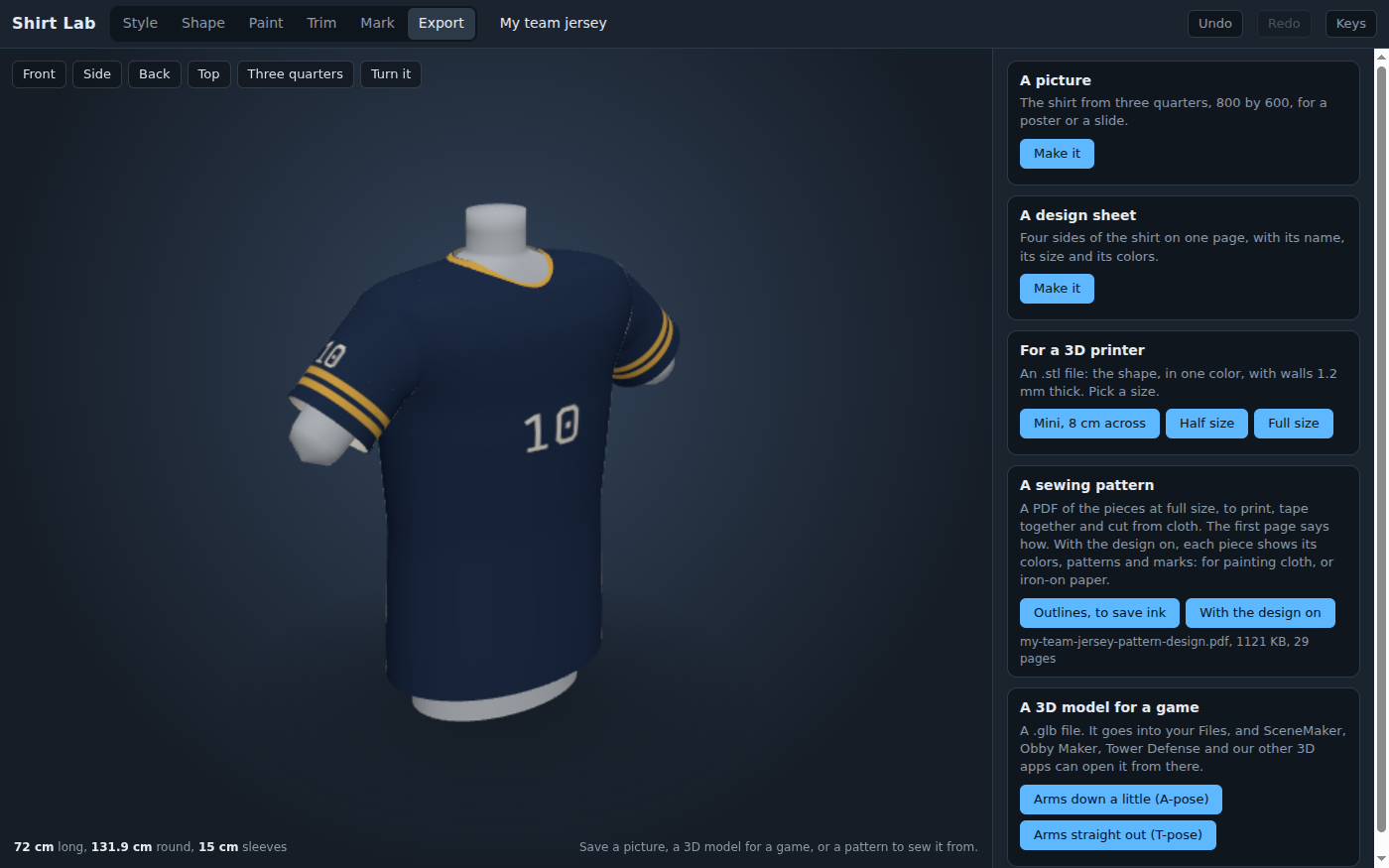
Then the shirt leaves the lab. The Export bench makes a picture, a design sheet, a sewing pattern, a file for a 3D printer and a 3D model for a game. The sewing pattern prints every piece at real size on ordinary paper, with a 1 cm seam allowance and a 5 cm square to check the printer by. A T-shirt is 14 pages to tape together, or 25 with the design printed on the pieces.
The football jersey as a sewing pattern with its design printed on: 29 letter pages to tape together, every piece at real size with its colors, stripes and numbers where they will be when it is sewn. Without the design, to save ink, the same jersey is 15 pages.
What they are learning while they play
Nothing here is presented as a lesson. This is what the activity is made of.
| What the student does | What it is |
|---|---|
| Sets a chest size of 96 cm and reads about M | Measurement and units. The same chest is 96 centimeters, 38 inches, or about a medium. The centimeters are a measurement; the letter sizes are only a rough guide, since makers do not agree on them, and the lab says so. |
| Makes the chest bigger and watches the whole shirt grow | Scale and proportion. Scaling multiplies every length by the same number. A chest eight percent bigger gets a shirt eight percent longer, so the shape does not change. |
| Turns a 3D shirt into flat pieces of paper | Nets and flat patterns. A shirt is sewn from flat pieces. The pattern has to be drafted so that the flat pieces, sewn together, make the curved shape: the sleeve's top is made exactly as long as the armhole it goes into. |
| Cuts the front and back on the fold | Symmetry. The front of a shirt is the same on both sides of its middle, so the pattern gives half of it and the cloth is folded to cut the whole. With a number printed on, the front is given whole, because a number is not the same on both sides. |
| Gets a left sleeve and a right sleeve with the design on | Reflection. The two sleeves are mirror images of each other. The lab flips one and turns its picture the other way round, so the number reads the right way on both arms. |
| Checks the 5 cm square with a ruler before cutting | Scale drawings. The pattern is printed at 1 to 1. If the printer shrinks the page to fit, every piece is too small, and the square shows it before any cloth is cut. |
| Saves the shirt as a 3D model in a T-pose | 3D files and game assets. A model file carries the shape, the colors and a starting point. Characters in games are usually built with their arms straight out, so the lab can save the shirt that way. |
| Reads the names of the parts: yoke, placket, cuff, hem band | Design vocabulary. Every trade has words for its parts. Using them is how a designer explains a shirt to the person who has to sew it. |
How to tell whether it landed
Ask, and let them show you. A student who has understood it can answer these without help.
- Why is the shirt bigger round than the chest you set?
- When you made the chest bigger, why did the sleeves get longer too?
- Why is the front given as half a piece, and when does the lab give it whole?
- What would happen if you printed the pattern with fit to page switched on, and how would you find out before cutting?
- Why does the top of the sleeve have to be the same length as the armhole?
Use it in your subject
Not a technology class? Then the app is how students show what they learned in your unit. More projects for every subject.
Math
Measure chests with a tape, set each size in the lab, and work out how much bigger each shirt should be as a percentage. Check the answers against the readout.
Art and design
Design a jersey for a made-up team: its colors, its pattern, its name and its numbers. The design sheet is the finished page to hand in.
Family and consumer science
Print the sewing pattern for a simple T-shirt, tape it together, and cut and sew it from an old sheet before trying real cloth.
Computer science
Save a shirt as a 3D model and put it on a character in another app. Talk about why games usually build characters with their arms straight out.
Practical notes
- AgesAges 8 through high school. Younger students pick a style, paint it and put their name and number on it; older ones measure real chests, print the sewing pattern and prepare a shirt for a game.
- TimeA minute to a shirt of their own. A satisfying session is thirty to forty-five minutes. Sewing a shirt from the pattern takes a few more sessions.
- EquipmentA computer or Chromebook with a modern browser. The shirt is 3D, so a very old or very slow computer may struggle. Nothing to install. A tape measure, a printer and tape for the sewing pattern, if you like.
- CostFree. The app has no paid tier.
- PrepNone. Open the page and go. Reading this page first takes about three minutes.
- In a groupEveryone can start from the same style and the same chest size, then compare what each student changed.
For co-ops, microschools, and classrooms
Make a team. Each student designs a jersey in the same team colors with their own number, and the group agrees on a team name that is made up, not a real team's. With a free account the jerseys are saved and shared, and a student's Obby Maker runner can wear their own shirt.
Common questions
Is Shirt Lab free?
Yes. It runs in your browser and there is no paid tier. A free account adds saving and sharing, but nothing on this page is behind a paywall.
Does my child need an account to try it?
No. The demo on this page is the complete lab with a starter T-shirt. Make a free account to save a shirt, share it, and use it in the other 3D apps.
What kinds of shirts can it make?
Ten styles to start from: T-shirt, long sleeve, tank top, basketball jersey, soccer jersey, football jersey, hockey jersey, baseball jersey, polo and hoodie. Every shirt can have a crew, scoop or V neck, and each can be reshaped with sliders.
Can we really sew a shirt from it?
Yes. The Export bench makes a PDF of every piece at real size, on ordinary letter paper, with a 1 cm seam allowance, marks for cutting on the fold, and a first page that explains how to tape the pages together. Print it at 100 percent and check the 5 cm square first. The pattern can also be printed with the design on each piece, for painting cloth or for iron-on paper.
Which sizes does it use?
The chest measured round the body under the arms, in centimeters or inches, and a letter size from youth to XXL. Letter sizes differ from maker to maker, and the lab says so. The hoodie's hood is drafted for a head measurement the student sets.
Can students put their name on the back?
Yes, and a number, in plain or varsity letters, up to twelve letters long. The lab suggests a nickname or a team name works too, which is a good habit for anything that might be shared.
Can the shirt go into a game?
Yes. The Export bench saves a 3D model (a .glb file) to the student's Files, with the arms down a little or straight out, and SceneMaker, Obby Maker and the platform's other 3D apps can open it from there. In Obby Maker the student's runner can wear the shirt.
What ages is it for?
Ages 8 through high school. Picking and painting a jersey works for anyone; measuring, printing and sewing the pattern suit older students.
What subject can I log this as?
Most families log it as art and design, or as family and consumer science when a shirt is sewn from the pattern. The table above lists specifically what is covered, so you can pick the label your records need and point at the evidence.
Still have a question? Ask us, and a person will write back.
Where to go next
Start with Shirt Lab
Trying it costs nothing and takes about five minutes. An account is what makes the work last.
Shirt Lab is one of the making apps on the platform. It is a place to make things, not a course, and it is not a substitute for a teacher: it is at its best when an adult asks the questions above and takes the answers seriously.
Page last reviewed September 2026.