Car Design Lab
A car is a shape with a lot of decisions on it: how long the hood is, how low the roof, how big the wheels, what color, what stripe, what number on the door. Car Design Lab lets students make every one of those decisions on screen and see the car turn on a turntable as they do. The body is a real 3D shape they slide into a hatchback, a coupe, a pickup or a supercar; the wheels, the body kit, the livery and the decals go on over it; and the finished car leaves as a picture, a livery sheet for a model or a slot car, a hollow .stl for a 3D printer, or a .glb that opens in SceneMaker, Obby Maker and the other 3D apps. The livery can also be written as a few lines of code, and read back as blocks.
Using this with a class? Make a free class and add your students yourself: each gets a username and password, with no email or Google account needed. Or give them one join code. Using Google Classroom? Post the link there; with a free class, the link also puts each student in your class, so you see their work. mytekDev is also available from the Google Workspace Marketplace, so your school's Google admin can install it for everyone.A first lesson: Everyone designs a car for the same imaginary customer (a delivery company, a rally team, a family of six) and writes three sentences on why the body, the wheels and the livery fit the brief. Then they print the livery sheet and compare them on the wall.
Set up a free class Share to Google ClassroomWhat a student actually does
They open the lab on a hatchback 4.1 meters long with nothing on it. The readout under it says how long, how wide, how tall, the wheelbase and the rim size in inches. They drag it round, pick a sedan, a wagon, a coupe, a muscle car, a sports car, a supercar, an SUV, an off-road truck, a pickup, a van or a micro car instead, and slide the roof lower, the hood longer, the body boxier or rounder, the ride higher, the fender flares out. The length slider scales the whole car, and says it in meters, in feet, and as a 1:18 or 1:64 model.
On the Wheels bench they pick rims (five spokes, mesh, deep dish, steel, beadlock), the wheel size, the tire width and the stance, and whether the rims are chrome, satin or black. A wheel too big for the body lifts the body, so the tire never pokes through the hood. Under Kit they bolt on a rear wing with its own height, width and tilt, a splitter, side skirts, a hood scoop, a roof rack, a light bar, one to four exhaust tips, a diffuser, a bull bar, a shark fin. Each piece has its own color on the Paint bench, as do the body, the glass, the rims, the tires, the brake calipers and the turntable.
The Livery bench is the graphics as a whole: center stripes, a side stripe, a two-tone line, a contrast roof or hood, rally blocks, a checkered band, flames, each with a color and a slider or two. The Decals bench puts numbers, words, shapes, pictures and drawings on the doors, the hood, the roof, the nose or the tail by a tap, dragged into place, every one the size it says in millimeters on the real car; a door number reads the right way from both sides. Surprise me, on the Body bench, makes a whole random car as one undo step, which is the fastest way to find a starting point.
The livery can also be typed, one line a command: stripes down the middle, 2, 160 mm, white; number 7 on the doors, 300 mm; rims mesh; kit wing on. Run turns the lines into the same livery and decals the benches make, and the Blocks view shows the lines as blocks. Then Export: a picture, a four-view design sheet, a night picture, a livery sheet with the sides and the top laid flat at one scale with a millimeter rule, an .stl at mini, half or full size, and a .glb for the other 3D apps.
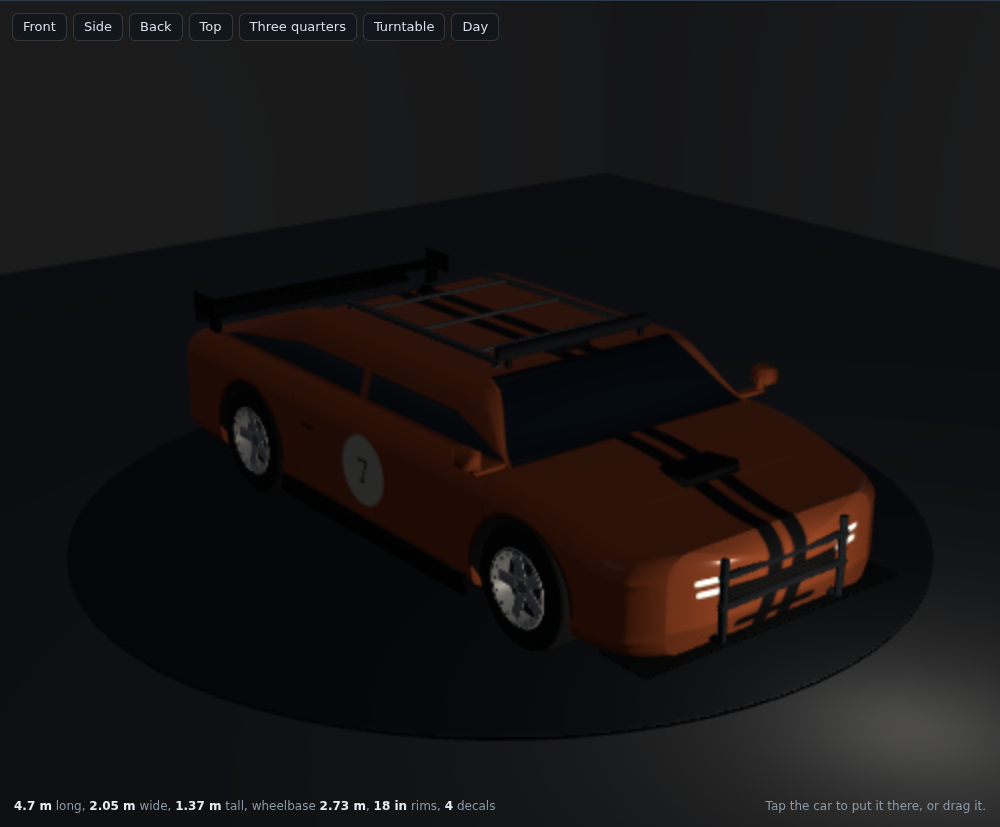
Night, from the button above the stage. The headlights and taillights are painted where the body's picture says they are, so they glow exactly there, and a point light in front of the car puts the pool on the floor. The same car by day is the picture a shared project shows.
What they are learning while they play
Nothing here is presented as a lesson. This is what the activity is made of.
| What the student does | What it is |
|---|---|
| Slides the wheelbase and watches the overhangs change | Proportion. A car is a few ratios: wheelbase to length, roof to body, wheel to arch. The sliders are those ratios, and the body types are presets of them. |
| Puts a number on the left door and finds it on the right, reading the right way | Mirror symmetry and handedness. A decal on one side of a symmetric object is mirrored on the other side as a layout, not as a picture: a 7 stays a 7. The lab keeps a picture per side for exactly this reason. |
| Types side stripe, 45 percent up, 110 mm, black | Coordinates and units. Along the car is a percent of its length, up the body a percent of its height, and the size is real millimeters, so the same line draws the same stripe on a micro car and a van. |
| Makes the wheels bigger and the body rises | Constraints. Two things that cannot both be true (a tire inside the hood) are resolved by a rule. Finding the rule, and whether it is the right one, is design. |
| Prints the car at mini size and reads 80 mm on the export | Scale. The same shape at 1:18, 1:64 and 8 centimeters across: the lab says each, and a printed mini makes the arithmetic real. |
| Reads the Blocks view of the lines they typed | A program is text. The blocks and the text are the same program. Changing a number in a block changes the line; typing a line adds a block. There is no magic in either. |
How to tell whether it landed
Ask, and let them show you. A student who has understood it can answer these without help.
- Why does the body rise when you make the wheels bigger, and what else could the lab have done?
- Your door number is 300 mm. How tall is it on a 1:18 model, and on an 8 cm print?
- Put the same stripe on a micro car and a van by code. What changes in the line, and what does not?
- Why does the lab keep a separate picture for each side of the car?
- Which three decisions made your car look like a race car, and which one would you take back?
Use it in your subject
Not a technology class? Then the app is how students show what they learned in your unit. More projects for every subject.
Math
Design a car, then work out the real length, width and height of a 1:18 model of it from the readout, and check against the lab's own answer. Then do a 1:64.
Science
Compare a sports car and a van from the front: which pushes more air, and why do the sliders that make a car look fast also make it low and narrow?
Art and design
Design a livery for a brief (a team, a company, a decade), print the livery sheet, and paint it onto a real model or a cardboard car.
Computer science
Write the whole livery as code, then hand the text to a partner who has to make the same car from it without seeing yours.
Practical notes
- AgesAges 8 through high school. Younger students pick a body, color it and press Surprise me; older ones work the proportions, write the livery as code, and prepare a print.
- TimeA minute to a car of their own. A satisfying session is thirty to forty-five minutes.
- EquipmentA computer or Chromebook with a modern browser. The car is 3D with shiny paint and shadows at night, so a very old or very slow computer may struggle. Nothing to install. A printer for the livery sheet, and a 3D printer if you want the mini.
- CostFree. The app has no paid tier.
- In a groupEveryone can start from the same body and the same brief, then compare what each student changed.
For co-ops, microschools, and classrooms
Give the room one customer and a budget of three changes each. With a free account the cars can be saved and shared, printed as minis, put into a SceneMaker street, or placed in an Obby Maker course as a prop.
Where to go next
Start with Car Design Lab
Trying it costs nothing and takes about five minutes. An account is what makes the work last.
Car Design Lab is one of the making apps on the platform. It is a place to make things, not a course, and it is not a substitute for a teacher: it is at its best when an adult asks the questions above and takes the answers seriously.
Page last reviewed October 2026.
Google, Google Classroom and Chromebook are trademarks of Google LLC.