Dragon Lab
Every student has drawn a dragon. Dragon Lab lets them build one in 3D, then asks the question a scientist would: could it fly? They pick a kind of dragon from the stories it comes from, shape its body, its neck and its tail, choose wings of skin or feathers, and give it a breath of fire, frost, sparkles, bubbles or lightning. They write the program it walks by and the one its wings beat to. Then the lab weighs it, measures its wings, and compares it with the biggest animal that ever flew.
Using this with a class? Make a free class and add your students yourself: each gets a username and password, with no email or Google account needed. Or give them one join code. Using Google Classroom? Post the link there; with a free class, the link also puts each student in your class, so you see their work.A first lesson: Everyone starts from the same dragon and reads its card: it says whether it could fly, and why. The challenge is to make a dragon that could, by changing only its body and its wings. Students compare what they changed. Most find that a bigger dragon needs much bigger wings, and the card's numbers say why.
Set up a free class Share to Google ClassroomWhat a student actually does
They open the lab on a friendly dragon and pick a kind: a Dragon, a Wyvern, a Long, a Drake, a Feathered serpent, a Sea serpent, a Hatchling or a Fae dragon. Dragons come from stories told all over the world, and they are not all the same animal, so each kind says where its shape comes from. On the Body bench sliders change the head, the muzzle, the neck, the body, the tail and the legs, and the spine can be bent by hand: drag its knots to raise the head, curl the tail or arch the back.
On the Wings bench they choose the wings and then spread, sweep or fold them: skin stretched over long fingers like a bat's, flight feathers like a bird's, two pairs a dragonfly would recognize, small fins for swimming, or none at all, for the kinds that fly without them. The Features bench adds horns or antlers, back spines, ridge plates, a mane, whiskers, cheek frills, gems and claws, and the Paint and Marks benches color it part by part. Buttons over the stage set its look: Friendly, Noble, Fierce or Low-poly. The readout under the stage gives its length, its wingspan, what it would weigh, and a short answer to whether it could fly.
On the Pose bench it moves. It breathes and looks round; it breathes out fire, frost, sparkles, bubbles or lightning; it walks and it flies. The walk and the wingbeat are programs the student writes, and rules say what the dragon does the rest of the time and what it does when someone taps it. Its share page runs those rules for anyone who opens it. The whole dragon can also be built by code, and any dragon can be turned back into the code that makes it.
The Export bench makes a picture, a design sheet, a printable dragon card, a sewing pattern, and a 3D model with a skeleton, so it can move in SceneMaker, Obby Maker, Tower Defense and the platform's other 3D apps. There is a dragon head made to go over an Obby runner's head, and wings for its back that flap when it jumps.
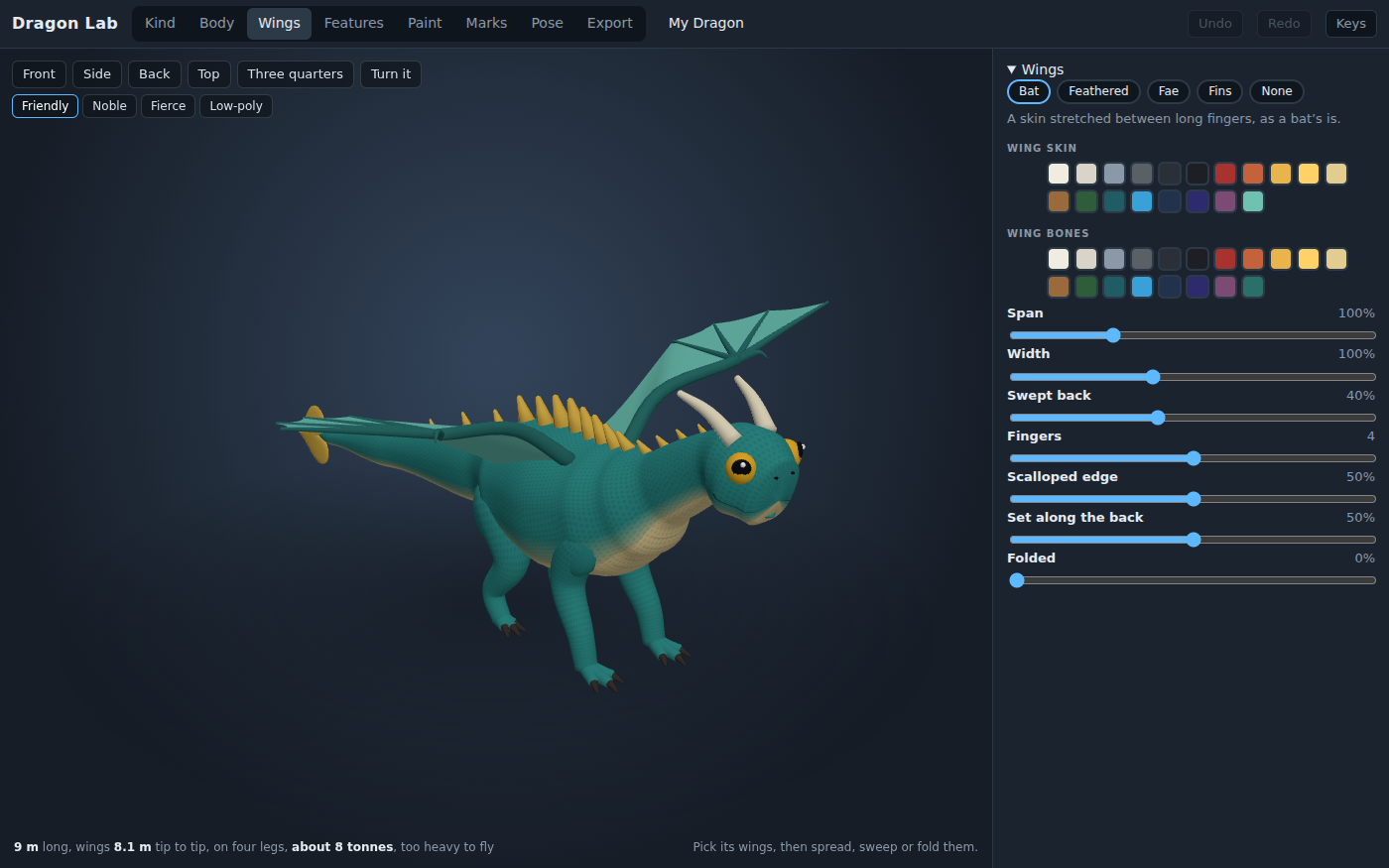
The wings, by kind and by slider. The readout under the stage answers the question every time something changes: this dragon, at 9 m and 8 tonnes, is too heavy to fly.
What they are learning while they play
Nothing here is presented as a lesson. This is what the activity is made of.
| What the student does | What it is |
|---|---|
| Makes a dragon bigger and finds it can no longer fly | Scaling: area and volume. Weight grows with volume and wing area with area, so doubling a dragon's size roughly doubles its wing loading. The card's numbers show why the biggest fliers were never as big as a story dragon. |
| Reads the card's could-it-fly line and changes the wings to fix it | Wing loading. Flight compares weight with wing area. The lab works out both from the 3D model and compares them with real birds and with the pterosaur Quetzalcoatlus, the biggest animal known to have flown. |
| Picks a Long, a Wyvern and a Feathered serpent and reads where each comes from | Myth across cultures. The dragon of Chinese stories, the two-legged wyvern of European heraldry and the feathered serpent inspired by Mesoamerican art are different ideas. The lab names where each shape comes from. |
| Writes the wingbeat as a program and watches it fly | Sequences and timing. A wingbeat is a sequence of positions over time. Changing a number changes how the dragon flies, and the student sees it at once. |
| Gives the dragon rules for when it is tapped | Events. A rule waits for something to happen, a tap or the pointer coming near, and then runs. The share page runs the same rules for anyone who opens it. |
| Builds a dragon by code, then turns a hand-made one back into code | Code that builds things. A design is data, and a short program can make it. Reading a finished dragon as code shows what every slider was setting all along. |
How to tell whether it landed
Ask, and let them show you. A student who has understood it can answer these without help.
- Your dragon could not fly. What did you change to fix it, and why did that work?
- Why can a small dragon fly when a big one with the same shape cannot?
- Where does your kind of dragon come from? What makes it different from the others?
- Read me your wingbeat program. What would happen if you made it faster?
- What does your dragon do when someone taps it on its share page?
Use it in your subject
Not a technology class? Then the app is how students show what they learned in your unit. More projects for every subject.
Science
Make the same dragon at three sizes and record what the card says about flight each time. Explain the pattern with area and volume, and compare it with real birds.
Social studies
Build three kinds of dragon and research the stories each comes from. Present how the shape of a dragon changes from one culture to another.
Computer science
Write a walk, a wingbeat and two rules for when the dragon is tapped. Then build a second dragon entirely by code.
Art and design
Design a dragon for a story you write, print its card and its design sheet, and explain each choice by the story.
Practical notes
- AgesAges 7 through high school. Younger students pick a kind, shape and paint it and make it breathe; middle schoolers chase the could-it-fly question; older students program the walk, the wingbeat and the rules, or build a dragon by code.
- TimeA minute to a dragon of their own. A good session is thirty to forty-five minutes: a dragon, its card, and one that could fly.
- EquipmentA computer or Chromebook with a modern browser. The dragon is 3D, so a very old or very slow computer may struggle. Nothing to install. A printer for the card and the design sheet.
- CostFree. The app has no paid tier.
- PrepNone. Open the page and go. Reading this page first takes about three minutes.
- In a groupEveryone can start from the same dragon and compare cards. The flight numbers come from published measurements of real birds and fliers, and the lab says which.
For co-ops, microschools, and classrooms
Run a dragon fair: everyone prints their dragon card, and the group sorts them into could fly and could not, then argues about the edge cases. With a free account the dragons are saved and shared, and each share page plays its dragon's rules.
Common questions
Is Dragon Lab free?
Yes. It runs in your browser and there is no paid tier. A free account adds saving and sharing, but nothing on this page is behind a paywall.
Does my child need an account to try it?
No. The demo on this page is the complete lab with a dragon loaded. Make a free account to save a dragon, share it, and use it in the other 3D apps.
Is it scary?
No. The dragon starts friendly, with big eyes and a smile; a fiercer look is there to choose, and the Hatchling is the cute one. There are no fights in it.
Could a dragon really fly?
That is the question the lab asks. It works out the dragon's weight and wing area from the 3D model and compares them with real birds and with the biggest animal known to have flown, the pterosaur Quetzalcoatlus. Most story-sized dragons could not; small ones with big wings can. The sources are listed in the project's notes.
Can the dragon go into a game?
Yes. The Export bench saves a 3D model with a skeleton that SceneMaker, Obby Maker, Tower Defense and the platform's other 3D apps can open, and it can move in them. There is also a dragon head and a pair of wings made for an Obby Maker runner.
What subject can I log this as?
Most families log it as art and design, or as science when the could-it-fly question is the point. The table above lists specifically what is covered, so you can pick the label your records need and point at the evidence.
Still have a question? Ask us, and a person will write back.
Where to go next
Start with Dragon Lab
Trying it costs nothing and takes about five minutes. An account is what makes the work last.
Dragon Lab is one of the making apps on the platform. It is a place to make things, not a course, and it is not a substitute for a teacher: it is at its best when an adult asks the questions above and takes the answers seriously.
Page last reviewed October 2026.