Tilemap Editor
Every 2D platformer level is a grid, and every cell of the grid points at one small picture from a sheet of tiles. This is the editor for building one. It opens on Grassy Hills: drag across a few tiles in the sheet, stamp them over the water, then hide the ground layer and see what the level is really made of. Free, in the browser, no account needed to try it.
Using this with a class? Make a free class and add your students yourself: each gets a username and password, with no email or Google account needed. Or give them one join code.A first lesson: Everyone gets the same tileset and ten minutes to build one screen of a level that has a gap to jump, a platform to reach and a reward on top.
Set up a free classWhat a student actually does
They drag across the grass-topped ground in the tileset and a two-by-two block sticks to the cursor. They click over the water and the gap is bridged. They switch to Fill, pick a coin, and click the sky, and the whole sky turns to coins. Ctrl+Z, and it is sky again. Then they hide the Ground layer and the level comes apart: coins and clouds float over nothing, and a grid of pink squares shows where the level is solid.
From there it is a level editor. The map can be resized, tiles flipped, blocks copied and pasted as a brush, and layers added, named, reordered and hidden. Any image can be the tileset: one drawn in Pixel Art, one from the asset library, or a free pack from the internet, with gaps and borders between tiles handled. With an account, a finished map goes straight to GameBuilder as a playable level, or out as a picture or a Tiled file for other game engines.
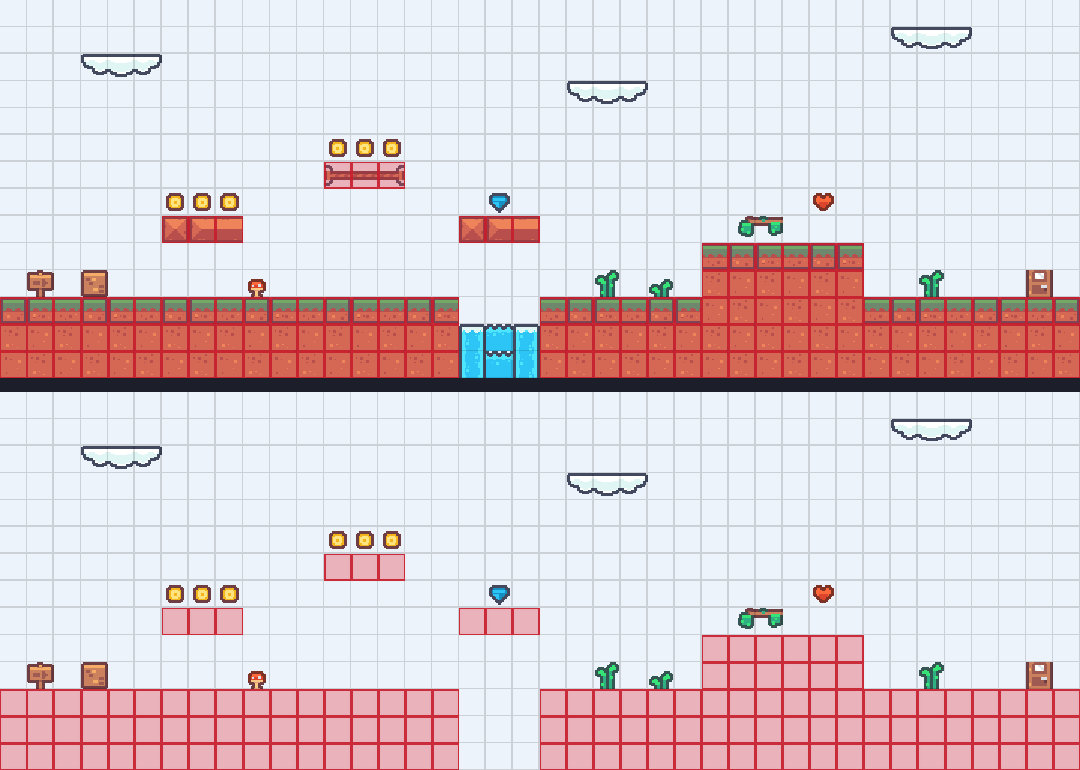
One level, three layers. Hide Ground and everything on the Things and Sky layers stays put, because each layer is its own grid. The pink squares are a fourth grid underneath them all: the cells marked solid, which is what a game checks when it decides whether a player is standing on something. The water gap has none, so a player would fall through it.
What they are learning while they play
Nothing here is presented as a lesson. This is what the activity is made of.
| What the student does | What it is |
|---|---|
| Picks a tile from the sheet | Sprite sheets. Games keep hundreds of small pictures in one image and cut out the piece they need. Each tile is a number that says which piece. |
| Paints the level cell by cell | Grids and coordinates. The map is columns and rows. Every tile has an x and a y, which is how the game knows where to draw it. |
| Floods the sky with Fill | Flood fill. Fill spreads from one cell to every connected empty neighbor. It is the same algorithm as the paint bucket in any drawing program. |
| Hides a layer | Layers. Background, ground and decoration are separate grids drawn on top of each other, so one can change without touching the rest. |
| Marks cells as solid | Collision. What a level looks like and what a player can stand on are two different things, stored separately. A tile can look like ground and be air. |
| Stamps a block, then repeats it | Reusable parts. A handful of tiles builds a whole world. Designers work from a small kit and repeat it, the way programmers reuse functions. |
| Places a gap and a platform | Level design. Where the gaps, rewards and climbs go decides whether a level is fun. That is a design problem with a player on the other end. |
| Sends the map to GameBuilder | Data between programs. The level is saved as numbers, so another program can read it and turn it into something you can play. |
How to tell whether it landed
Ask, and let them show you. A student who has understood it can answer these without help.
- What is actually stored in each cell of the map?
- Why do the coins stay when you hide the ground?
- A tile looks like ground but the player falls through it. What happened?
- How would you make the gap wider without drawing the grass again?
- Where would you put the coins so a player has to take a risk to get them?
Practical notes
- AgesAges 8 through high school. Younger students paint scenes with the pencil; older ones plan layers, collision and a level someone else has to beat.
- TimeA minute to the first change. A playable screen of level takes twenty to forty minutes.
- EquipmentAny computer or Chromebook with a modern browser. A mouse helps. Nothing to install.
- CostFree. The app has no paid tier.
- PrepNone. Open the page and go. Reading this page first takes about three minutes.
- In a groupEveryone can build from the same tileset, then swap levels and play each other's in GameBuilder.
For co-ops, microschools, and classrooms
Give the room one tileset and one rule, say a gap, a platform and a reward, and ten minutes. The levels come out completely different, and trading them to play in GameBuilder turns into a lesson on level design without anyone calling it one.
- Three starter levels: Grassy Hills, Desert Run and Snow Peak.
- Any image as a tileset, including ones students draw themselves in Pixel Art.
- One click sends a finished map to GameBuilder as a playable level.
- No install, no per-seat license. Chromebooks are fine, and student work is private by default.
Common questions
Is the Tilemap Editor free?
Yes. It runs in your browser and there is no paid tier. A free account adds saving and sending maps to GameBuilder, but nothing on this page is behind a paywall.
Does my child need an account to try it?
No. The demo on this page is the complete editor with a starter level. Make a free account and the level you changed comes with you as your first project.
What ages is it for?
Ages 8 through high school. Younger students enjoy painting a scene; older ones design levels meant to be played.
Can they use their own art?
Yes. Any image of tiles works as a tileset, whether it was drawn in Pixel Art, picked from the asset library, or downloaded as a free tile pack.
Can they play the level they make?
Yes, with a free account. File, then Send to GameBuilder, makes a new game with the map as its first level, solid cells included.
Does it install anything, and will it work on a Chromebook?
It installs nothing and runs in any modern browser, Chromebooks included.
What subject can I log this as?
Most families log it as computer science or art. Grids, coordinates and flood fill are computing, the tileset is digital art, and level design is design. The table above lists specifically what is covered, so you can pick the label your records need and point at the evidence.
Where to go next
Start with Tilemap Editor
Trying it costs nothing and takes about five minutes. An account is what makes the work last.
The Tilemap Editor is one of the making apps on the platform. It is a place to make things, not a course, and it is not a substitute for a teacher: it is at its best when an adult asks the questions above and takes the answers seriously.
The starter levels use Kenney's Pixel Platformer tiles, released into the public domain (CC0). Source.
Page last reviewed September 2026.