Voxel Art
A voxel is a pixel with depth: one small colored cube, placed at a whole-number spot in 3D space. Stack enough of them and you have a cottage, a character or a whole room, and the model is solid all the way through, not a painted shell. Voxel Art opens on an island cottage built from 2,116 of them. Turn it around, click the roof to add a cube, and it is already yours. Free, in the browser, no account needed to try it.
Using this with a class? Make a free class and add your students yourself: each gets a username and password, with no email or Google account needed. Or give them one join code.A first lesson: Everyone builds the same small object, a mug, a lamp or a chair, in under 200 voxels, then the class compares how differently each one reads at that size and what the builder chose to leave out.
Set up a free classWhat a student actually does
They drag across the island to spin it, then open DRAW, choose Add, pick a color from the strip on the right and click the roof. A cube appears against the face they clicked, the way a brick goes onto a wall. Remove takes one away, and PAINT recolors cubes without adding any. Within a few minutes the cottage has a second chimney or a boat in the pond.
Then they start their own. Box and rectangle tools lay down floors and walls in one drag, a bucket fills every cube of one color, and SYMM mirrors whatever they draw so both sides of a character match. A picture can be turned into voxels, and a word can be spelled out in cubes. The slice view shows one layer at a time. When a model is done, RENDER lights it with light that bounces between surfaces, and with an account, EXPORT saves it as an STL for a 3D printer or as a GLB or OBJ for games and other 3D programs.
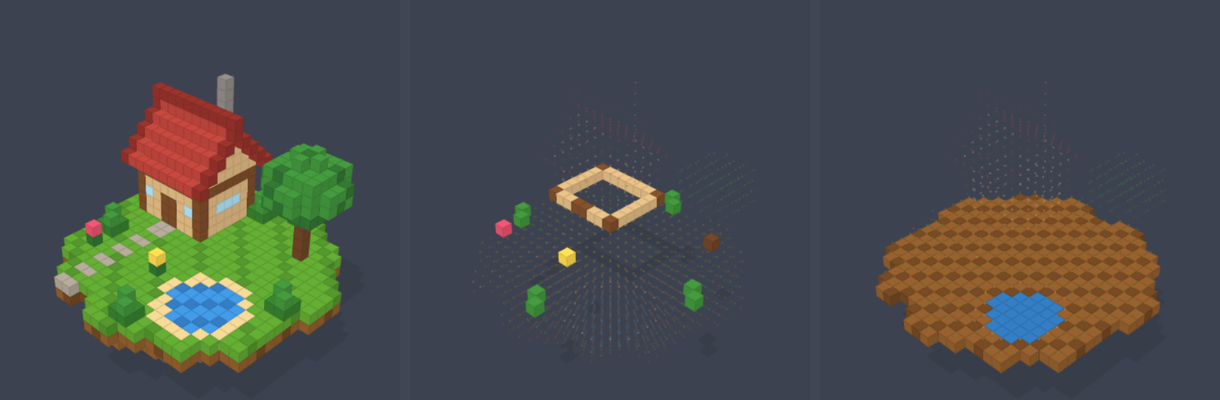
The same island, then two single layers of it from the slice view. At wall height the cottage is just an outline, like a floor plan. One layer below the grass the island is solid dirt, with the pond's water sitting in a hollow. A voxel model has an inside, and looking at it one layer at a time is how a 3D printer builds an object and how a medical scanner shows the inside of a body.
What they are learning while they play
Nothing here is presented as a lesson. This is what the activity is made of.
| What the student does | What it is |
|---|---|
| Clicks a face to add a cube | 3D coordinates. Every voxel sits at a whole-number x, y and z, with y pointing up. Select one voxel with Measure Volume and the app shows its coordinates. |
| Decides how many cubes a face gets | Resolution. A voxel is to 3D what a pixel is to a picture. More, smaller cubes give more detail and take more work, so every model is a choice about what to keep. |
| Selects a block of cubes and counts them | Volume. Each voxel is one cubic unit, so counting voxels is measuring volume. Measure Volume counts every cube in the box you drag. |
| Turns on SYMM before drawing a face | Symmetry and reflection. Mirroring across an axis puts every cube at the same distance on the other side. It is the same reflection as in geometry class, done in three dimensions. |
| Steps through the slice view | Cross-sections. Seeing one layer at a time is how a 3D printer builds an object and how a CT scan shows the inside of a body. |
| Checks the front, top and side views | Orthographic views. Flat views with no perspective are how engineers and architects draw an object so its measurements can be read off the page. |
| Picks a small set of colors | Palettes. A limited palette keeps a small model readable. Pixel artists and game artists work the same way. |
| Renders the finished model | Path tracing. The computer follows rays of light as they bounce from surface to surface. More bounces give softer, more realistic light and take longer, the same tradeoff film studios make. |
| Exports an STL | 3D file formats. STL describes only the surface triangles, which is what 3D printer software reads. GLB also carries colors, for games and the web. |
How to tell whether it landed
Ask, and let them show you. A student who has understood it can answer these without help.
- What is the difference between a pixel and a voxel?
- Where is the cube you just placed? Give its x, y and z.
- How many voxels are in your model's base? How did you find out?
- What did symmetry save you from doing by hand?
- Show me one layer of your model. What would a 3D printer be doing at that layer?
Use it in your subject
Not a technology class? Then the app is how students show what they learned in your unit. More projects for every subject.
History
A building from the period, a pueblo, a Roman house or a longhouse. The slice view turns it into a floor plan for the presentation.
Math
Build an object in under 300 voxels, then use Measure Volume to count them and work out the surface.
Science
A model with its inside built in: the layers of the Earth or of a volcano, shown one slice at a time.
Practical notes
- AgesAges 8 through high school. Younger students add to the cottage and build small objects; older ones build characters and scenes with symmetry and export them for printing or games.
- TimeA minute to the first cube. A small object of their own takes a class period; a character or a room takes two or three.
- EquipmentA computer or Chromebook with a modern browser and 3D graphics (WebGL). A mouse makes clicking small faces much easier than a trackpad. Nothing to install.
- CostFree. The app has no paid tier.
- PrepNone. Open the page and go. Reading this page first takes about three minutes.
- In a groupEveryone can build the same object at the same size limit, and the room compares what each builder kept.
For co-ops, microschools, and classrooms
Give everyone the same brief and a cube limit: a mug in 200 voxels, a lamp in 300. Small limits make students decide what matters about an object, and the finished models are easy to compare side by side. A class with a 3D printer can take the best ones all the way to a real object.
- Add, remove and paint single cubes, or whole boxes and rectangles at once.
- Symmetry, a slice view, and pictures turned into voxels.
- Exports STL for 3D printing, and GLB and OBJ for other 3D programs.
- No install, no per-seat license. Student work is private by default.
Common questions
Is Voxel Art free?
Yes. It runs in your browser and there is no paid tier. A free account adds saving and exports, but nothing on this page is behind a paywall.
Does my child need an account to try it?
No. The demo on this page is the complete editor. Make a free account and the island comes with you as your first project.
Can we 3D print what they make?
Yes. With an account, a model exports as an STL file, the format 3D printer software reads. The 3D Printer Simulator on the platform opens STL files too, so a class without a printer can still watch one get built layer by layer.
How is this different from Minecraft?
Both are built from cubes, but Voxel Art is a modeling tool, not a game. Every cube can be any color, models are small and precise, and the finished work exports as a real 3D file.
Will it work on our computer?
On most. It needs a browser with 3D graphics, which almost every computer from the last several years has.
What subject can I log this as?
Most families log it as art. Coordinates, volume, symmetry and cross-sections are math, and file formats and rendering are computer science. The table above lists specifically what is covered, so you can pick the label your records need and point at the evidence.
Where to go next
Start with Voxel Art
Trying it costs nothing and takes about five minutes. An account is what makes the work last.
Voxel Art is one of the making apps on the platform. It is a place to make things, not a course, and it is not a substitute for a teacher: it is at its best when an adult asks the questions above and takes the answers seriously.
Based on Voxel Builder by nimadez, used under the GPL-3.0 license. Source.
Page last reviewed September 2026.