Night Sky Lab
Most children have never found the North Star, and most adults could not show them how. Night Sky Lab puts tonight's sky on the screen for any city on any date: the bright stars at their real brightness and color, the Moon in its real phase with the lit side toward the Sun, the planets that are up, a treeline and compass letters on the ground. The first minute ends with Polaris found from the Big Dipper's Pointers, and the sky turning around it. After that the student plans a real night outside, because the app is for planning and the stars are outdoors.
Using this with a class? Make a free class and add your students yourself: each gets a username and password, with no email or Google account needed. Or give them one join code. Using Google Classroom? Post the link there; with a free class, the link also puts each student in your class, so you see their work. mytekDev is also available from the Google Workspace Marketplace, so your school's Google admin can install it for everyone.A first lesson: Everyone does the first minute: find the Big Dipper, drag from the Pointers to Polaris, drag the time strip and watch the Dipper swing while Polaris stays put. Then press Same time, next month three times and ask what changed. Finish by planning one real night for the week: what will be up at 8 pm, which way to look, how many fists above the horizon.
Set up a free class Share to Google ClassroomWhat a student actually does
They find the Big Dipper, then drag a line from the two stars at the front of its cup, Merak through Dubhe, and keep going about five times the gap between them until they reach Polaris. Then they drag the time strip, and the whole sky wheels around that one star through the night. The app says why in one sentence: the sky turns around Polaris because Earth turns. A city far enough south gets the Southern Cross instead, and learns that no bright star marks the south pole of the sky.
They turn the calendar. Same time, next month moves the date and keeps the clock, and the stars have moved about two hours' worth: Orion is a winter figure because in summer it is up in the daytime. The Moon screen shows its phase for every day of the month, when it rises and sets, and a log for the shape the student actually saw outside. Planets up tonight lists what is above the horizon and where, and Planets through the year shows which ones are evening, midnight or morning planets month by month.
They plan a real night. Plan a star party is a sentence: a name, a date, from when to when, where, and who is coming. The app lists what will be up in the middle of it, the Moon and the planets first, then the constellations standing highest, each with a direction and a height in fists. Add three to the targets, tick what to bring, and the plan is kept with the project. Dark sky: city or park slides from a big city to a dark park so the student sees what streetlights take away, and My observing log keeps what they saw when they went out.
They make their own. My constellation joins stars with taps and keeps a name and a story for it. My tour is a row of step cards, each one a command like Face north, Wait one hour or Find Polaris, that plays back as a guided tour of the sky for someone else. Print a sky chart gives a whole-sky circle for the date, time and place, with the lines, the names, the Moon and the planets on it. Three modes set the depth: Little has big stars, eight star pictures and reads its cards aloud; Explorer uses compass words and fists; Astronomer adds degrees, magnitudes, light-years and the coordinate grids.
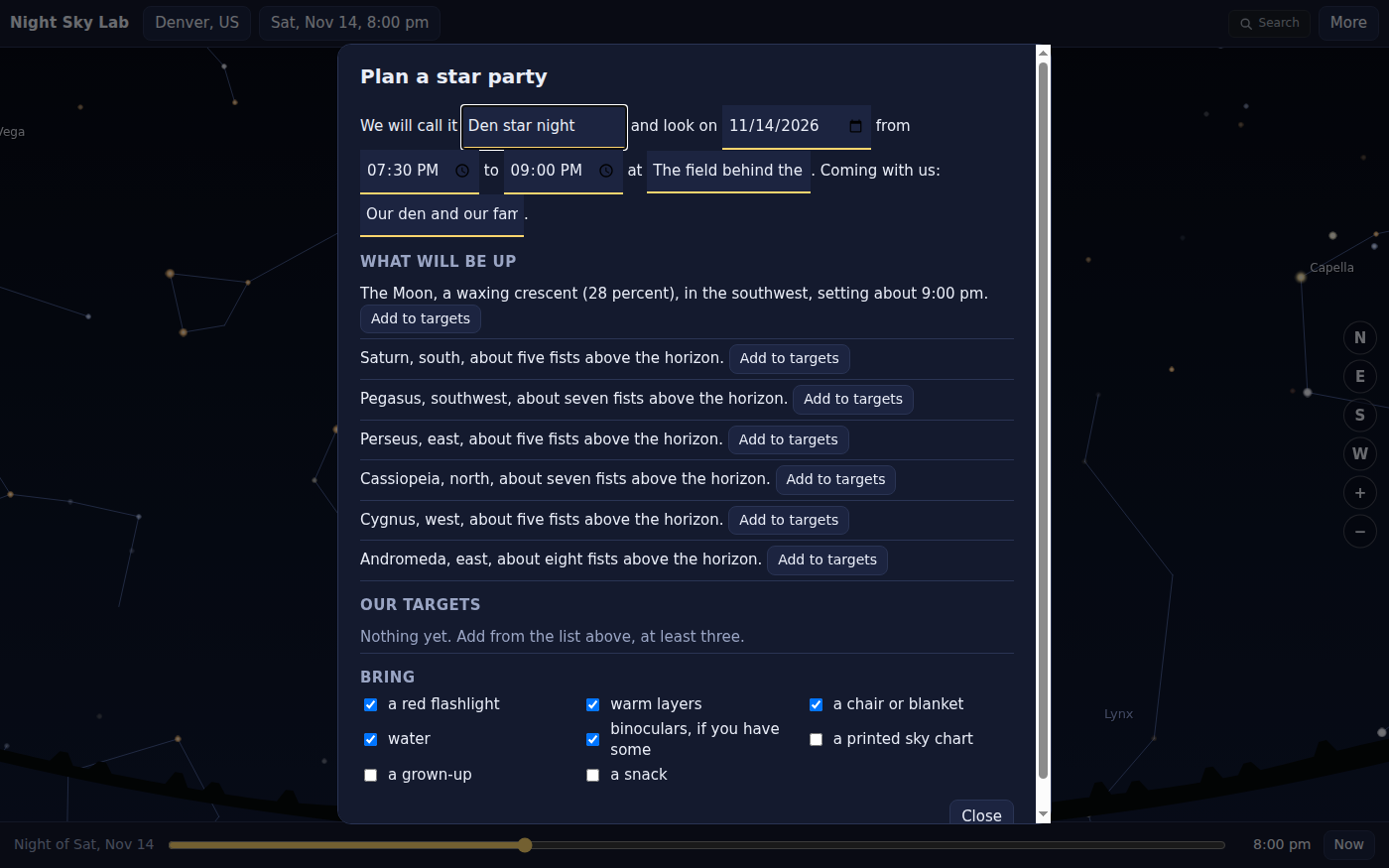
A star party plan is a sentence the student fills in. The app answers it with what will be up at the middle of that night, in compass words and fists at arm's length, and says so when a bright Moon will wash out the faint stars.
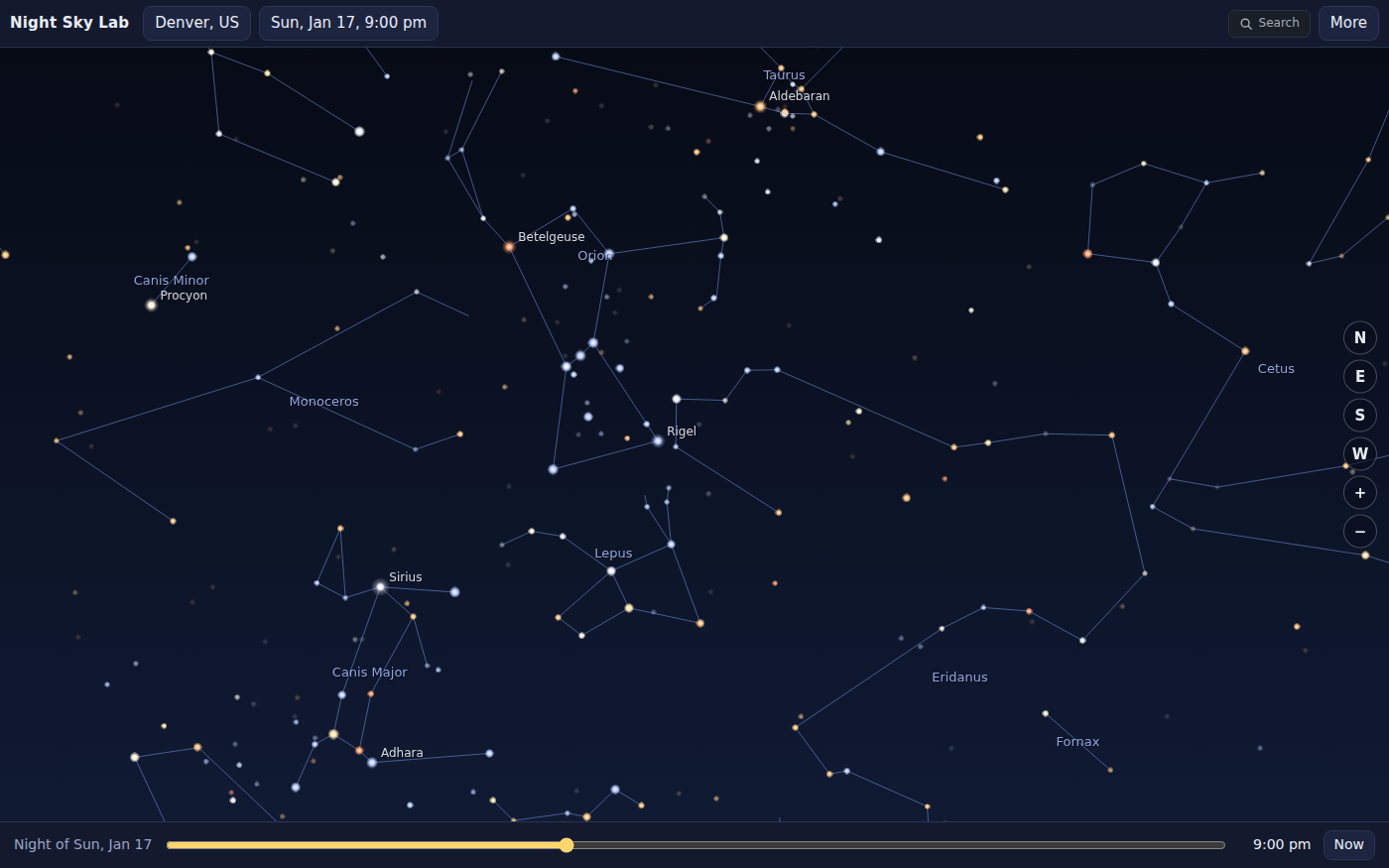
The same city in January at 9 pm, facing south. Star colors come from the catalog, so Betelgeuse is orange and Rigel blue-white, and the winter figures stand where they really stand that night.
What they are learning while they play
Nothing here is presented as a lesson. This is what the activity is made of.
| What the student does | What it is |
|---|---|
| Follows the Pointers from the Big Dipper to Polaris | Finding the North Star. Polaris is not the brightest star; it is the one almost exactly over Earth's axis. A star hop from a shape everyone can find is how people have always located it. |
| Drags the time strip and watches everything circle one star | Earth's rotation. The stars do not move across the sky on their own. Earth turns once a day, so the whole sky appears to wheel around the point its axis points at. |
| Steps a month at the same clock time and sees new stars in the south | Seasonal stars. As Earth goes around the Sun, the night side faces a different part of space. The same stars come back to the same place at the same time a year later. |
| Steps the Moon a day at a time and watches the lit side grow | Moon phases. Half the Moon is always lit by the Sun. The phase is how much of that half faces Earth, and the Moon rises later each day as it goes around. |
| Measures a planet's height in fists at arm's length | Altitude and direction. A fist held at arm's length covers about ten degrees of sky. A compass direction and a height are all anyone needs to point at something, and Astronomer mode names them altitude and azimuth. |
| Slides from a big city to a dark park | Light pollution. City lights brighten the sky so the faint stars disappear first. The same night from a dark place shows many times more stars, which is why a star party picks its spot. |
How to tell whether it landed
Ask, and let them show you. A student who has understood it can answer these without help.
- You are outside and you can see the Big Dipper. How do you find the North Star from it?
- Why does Polaris stay put when the rest of the sky turns?
- Orion is easy to see in January. Why can't you find it on a July evening?
- Tonight the Moon is a thin crescent. Will it be bigger or smaller in a week, and where in the sky would you look?
- Your star party is the night of a full Moon. What will be hard to see, and what would you look at instead?
Use it in your subject
Not a technology class? Then the app is how students show what they learned in your unit. More projects for every subject.
Science
Earth and space science: day and night, the stars of each season, Moon phases, why planets move against the stars, and how much a city's lights hide.
Geography
Latitude you can see: Polaris stands as high above the horizon as the city is north of the equator, and the Southern Cross only appears for places far enough south.
Math
Measuring angles with a fist, the Pointer gap times five, and in Astronomer mode degrees, magnitudes and light-years read from a card.
Practical notes
- AgesBuilt for ages 8 to 11. Little mode reads its cards aloud and keeps eight star pictures, so a younger child can use it with an adult. Astronomer mode, with coordinates, magnitudes and distances, suits middle school and the first years of high school.
- TimeThe first minute takes five. A star party plan takes fifteen. The night outside takes as long as the sky is clear.
- EquipmentA computer or Chromebook with a modern browser. Nothing to install. For the real night: warm clothes and, if you have one, a flashlight with red cellophane over it.
- CostFree. The app has no paid tier.
- PrepNone. If you plan a real night out, check the weather and the Moon screen for that date first; a bright Moon washes out the faint stars.
- In a groupEveryone does the first minute on the same sample city, then picks their own. A group can plan one star party together and each bring a target to find.
For co-ops, troops, microschools, and classrooms
The sky the group will see on the night it goes out, planned in daylight. One session: the first minute to Polaris, a month of the Moon, and a star party plan with three targets each. The observing log is filled in after.
- Any city in the world with 150,000 people or more, picked from a list or a map. The app never asks for a location.
- Positions checked against NASA JPL's Horizons ephemeris for the Sun, Moon and planets.
- Prints a whole-sky chart for the date and place, and a Moon calendar for the month.
- A free teacher account covers up to 50 students, and student work is private by default.
Common questions
Is Night Sky Lab free?
Yes. It runs in your browser and there is no paid tier. A free account adds saving and sharing, but nothing on this page is behind a paywall.
Does it need my location?
No, and it never asks. You pick a city from a list or tap a spot on a world map, and the place is kept only to the whole degree.
Is it a point-at-the-sky phone app?
No. It does not use a compass, a camera or GPS. It shows what the sky will look like and explains why it moves, so the real looking happens outside with your own eyes.
Will I see exactly what is on the screen?
The stars, Moon and planets are where the app puts them. What you see depends on clouds, trees and streetlights, which the app cannot know. The dark sky slider shows a typical sky for how dark your place is.
Does it work in the Southern Hemisphere?
Yes. Pick a city south of the equator and the guide finds the Southern Cross and the south pole of the sky instead of Polaris.
What ages is it for?
Ages 6 to 15. Little mode for the youngest with an adult, Explorer for most children, Astronomer for anyone ready for degrees, magnitudes and light-years.
Still have a question? Ask us, and a person will write back.
Where to go next
Badge kits and learning kits
Step-by-step projects in Night Sky Lab that end with a certificate: for a scout badge, or for homeschool families and classes.
- Sky adventurer: planets, Moon and stars: Girl Scouts Brownie Space Science Adventurer badge, or the learning kit for grades 2-3
- After dark: explore the night: Girl Scouts Cadette Night Owl badge, or the learning kit for grades 6-8
- Light from the stars: Girl Scouts Cadette Space Science Researcher badge, or the learning kit for grades 6-8
- Sun, Moon and stars: Girl Scouts Daisy Space Science Explorer badge, or the learning kit for grades K-1
- Space investigator: the Sun, stars and beyond: Girl Scouts Junior Space Science Investigator badge, or the learning kit for grades 4-5
- Read the sky, day and night: Girl Scouts Senior Sky badge, or the learning kit for grades 9-10
Start with Night Sky Lab
Trying it costs nothing and takes about five minutes. An account is what makes the work last.
Night Sky Lab is one of the making apps on the platform. Stars from the Yale Bright Star Catalog, 5th revised edition (Hoffleit and Warren, NASA HEASARC); star names from the IAU Working Group on Star Names; distances from the Hipparcos new reduction (van Leeuwen 2007, CDS VizieR); constellation figures from the Stellarium western sky culture (CC BY-SA); cities from GeoNames (CC BY 4.0); land from Natural Earth; positions computed with Astronomy Engine by Don Cross (MIT).
Page last reviewed October 2026.
Google, Google Classroom and Chromebook are trademarks of Google LLC.